
Appearance
Reviewing pull requests in the dashboard
The same review as dqx review, in a browser tab of its own: the pull requests of a project on Bitbucket or GitHub, a review running in the background, and the findings laid out like the diff on the forge, each one a draft comment under its line. Beside it, a human review for reading the pull request yourself, in the order the change runs, with your own comments and code suggestions.
A tab rather than a dialog, because a review runs for minutes and a dialog would hold the rest of the dashboard up meanwhile. Several reviews can run in several tabs, and a reload or a bookmark keeps where you were.
The pictures on this page come from dqx dashboard --demo, so every repository, person and pull request in them is invented.
From a card
A project with a repository on Bitbucket Cloud or GitHub.com gets review pull requests in its ··· menu, also a project dqx has no config for. It opens the pull requests of all the project's repositories in a new tab.
Two quiet chips follow in the card's foot:

6 PRs | the open pull requests of all the project's repositories, once the list has been fetched; the tooltip splits it per repository (crm 3 · sites 2 · docker 1); click for the list |
reviewing… | a review of this project is running, here or in a terminal; click to go to its tab |

The count is fetched when you open the menu or the tab, never on every refresh of the page: fifty projects must not mean fifty calls to Bitbucket every few seconds.
Pull requests
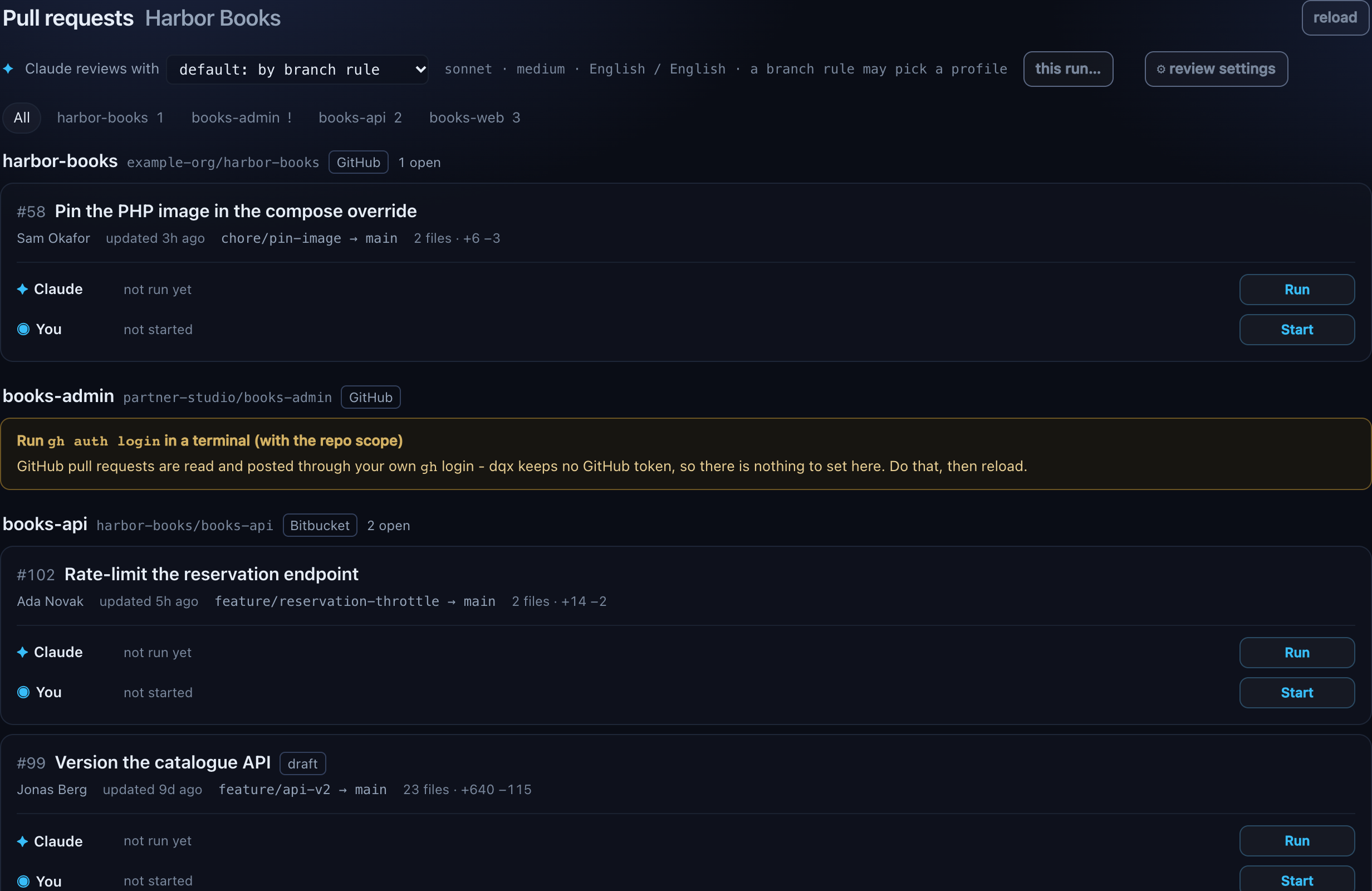
One row per open pull request, drafts included and marked draft: the title, source → target (a long branch is cut in the middle, the full name is in the tooltip), the author, when it was last updated and its size in files and lines. reload asks the forges again.
When it was reviewed before, the row says so: last review, the commit, how long ago, n of m posted and what it ran with (model, effort, profile), with head moved when commits arrived since. Open shows that result without spending anything on a new run.
Several repositories show on one page, grouped: a header per repository with its short name, owner/repo, the forge and how many are open. The chips above the list filter to one repository (All shows every group), with the count per repository or a ! for one that could not be listed; the choice is remembered per project. A repository that could not be listed says why in its own group, with Set a Bitbucket token or the gh command to run, while the others list as normal. Which repositories count, and how a project without a config is handled, is the same as in the terminal: see a project with several repositories.
Review starts a run. The first time for a repository it asks first, in the row, with the same sentence as the terminal: code goes to Claude only for repositories where the CTO approved Claude Code. Confirm and review records the answer for that repository, for the terminal as well.

When a review of that repository is already running, the row says so, and Show that review goes to it.
Choosing per run
Above the list, one line sets the next run. Review with picks the profile:
- the first option is what choosing nothing gets:
default: none, ordefault: by branch rulewhen the project has branch rules; none, the plain review, whatever a rule or the last run chose;- then the profiles, under where each is set up: this project, this machine and built into dqx. Each option names its model and effort, such as
security · opus · high.
Beside it, a quiet line says what a run gets: the model, the effort and the review language / code samples language. A value that comes from the chosen profile is marked with its name, such as opus (security); one you changed for this run is marked (this run); one nobody set says claude's default model. With no profile chosen and branch rules in the project, the line ends with a branch rule may pick a profile. The tooltip spells out what the config files come to. The order in which all of it is weighed is in the review settings.

this run… opens the rest of a run's choices: model (the aliases, or custom… for a full model id), effort, language and code samples. The first option of each is what a run gets without a change, such as default: opus (security), so choosing a profile shows its model and effort there without writing them into anything. A change counts for the reviews started from this page and wins over everything, the remembered choices of a pull request included. The button then reads this run: 1 changed and a reset link appears beside it; untouched, it stays unmarked.
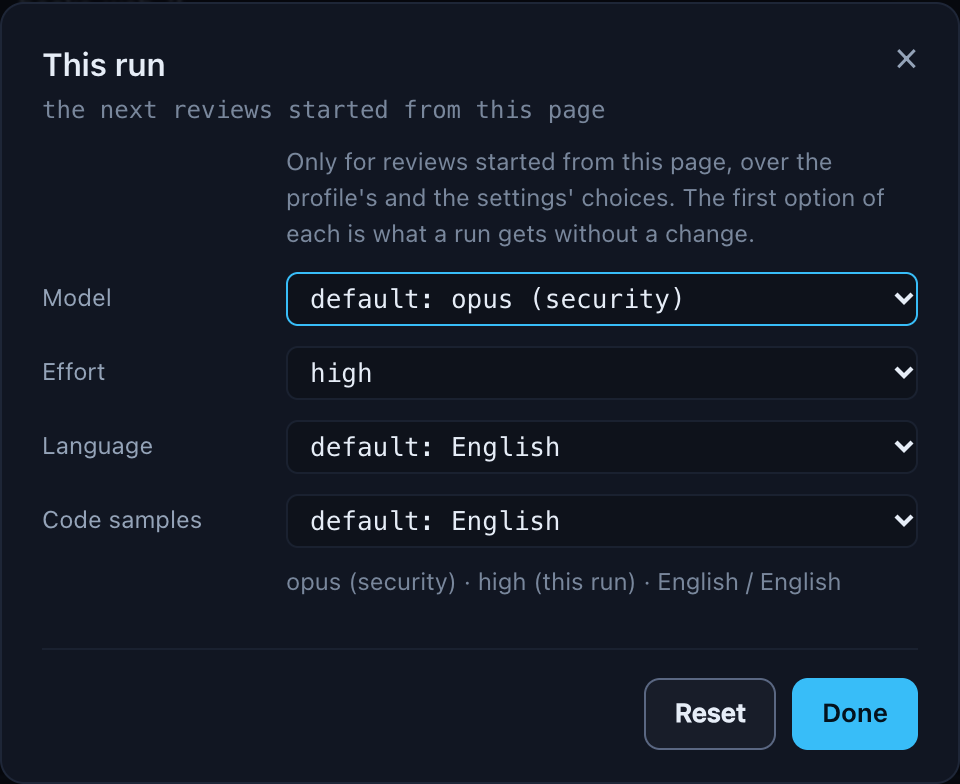
A profile that no longer exists, or an effort dqx does not know, is refused before anything starts.
Review settings
⚙ review settings at the end of the line is every review setting in one popup, with a tab for the project and one for the machine. Both are read when it opens, so switching never waits.
This project is the project's review: block in .dq/config.yml, which is committed, so it counts for whoever reviews the project:
- model, effort, language and code samples: the project's defaults. An empty field says
machineand leaves it to the other tab. - profiles: a name, an instructions file relative to the project root, and optionally a model and an effort. Open in editor opens the instructions file; Create and open writes a starter there first when it does not exist yet. A profile's instructions replace the project's
.dq/review.mdand are read from the pull request's target branch, so commit the file there. - built into dqx:
quick,thoroughandsecuritywith their model and effort, read-only, because their instructions are part of dqx. One that a profile of the same name replaces is struck through, withreplaced by this project'sorreplaced by the machine's. replace with a project profile adds a profile row with the built-in's name, model and effort to change from there. It has no instructions file until you name one, so it reviews with the project's.dq/review.mdrather than dqx's text: see built-in profiles. - map flows: when the flow map of the human review is made. on request (the default) waits for Map the flows; with every review has each AI review's Claude run bring the map along, so it is there when the review finishes.
- branch rules: a source branch pattern and the profile it picks, the built-ins included, first match wins, with arrows to change the order. A rule chooses for a pull request's first review; a re-review starts from its last run's choices.
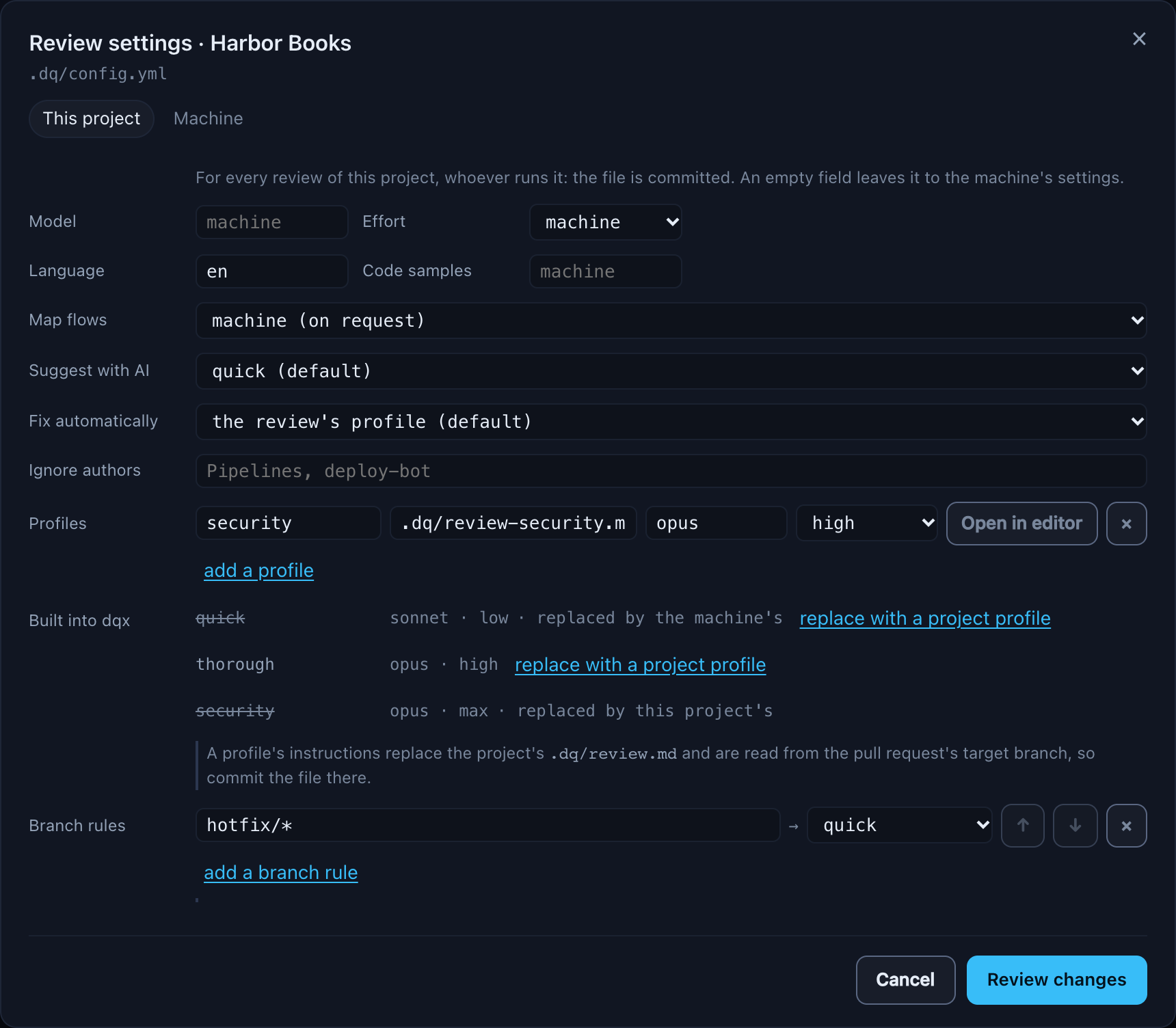

Review changes lists every value that changes, from and to, before Write .dq/config.yml writes it and keeps the previous file as .dq/config.yml.bak. Nothing is restarted. Something dqx would drop when it reads the file back, such as a rule naming a profile that does not exist, keeps the button disabled until it is fixed. The block is replaced whole when it is written, so a comment or a key dqx does not know inside review: does not survive it; the rest of the file is kept.
A project without a dqx config has nowhere to keep review settings, so the tab says why instead of showing a form: the review block lives in a v4 .dq/config.yml, dqx adopt shows what adopting writes and dqx adopt --write applies it. Until then its reviews use this machine's settings and the profiles built into dqx.
Machine is this machine's defaults for every review: model, effort, review language and code samples, written into ~/.config/dqx/config.yml. A project's .dq/config.yml beats them, and an empty field leaves it to the project, or to Claude's own default. Open in editor opens ~/.config/dqx/review.md, the instructions added to every review on this machine, before the project's own. The rest of the machine config is kept as it was, comments included.
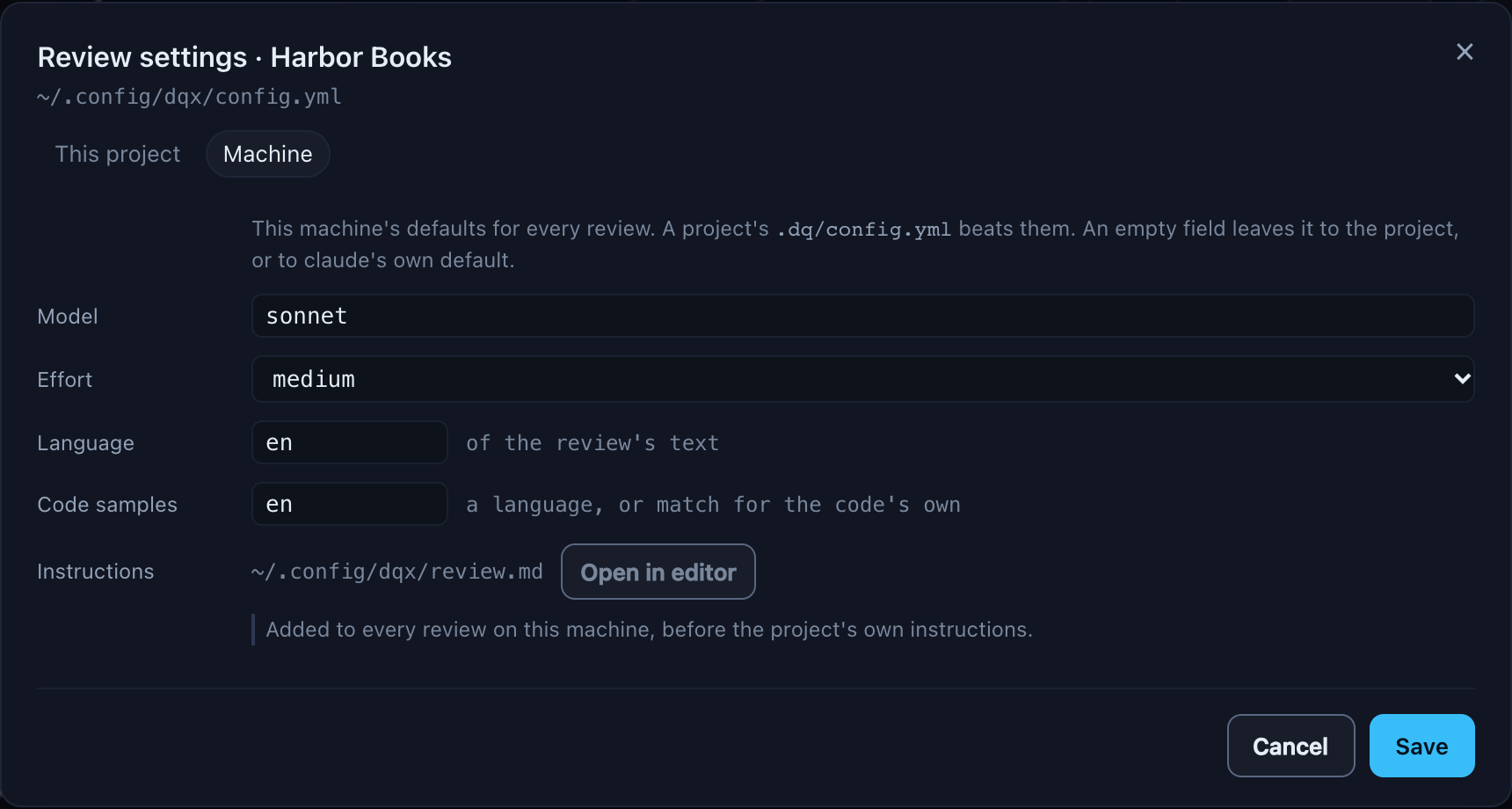
The gear on a project's card links here instead of editing review settings itself: the gear's review line. A read-only dashboard (--read-only) shows both tabs but saves neither.
A review
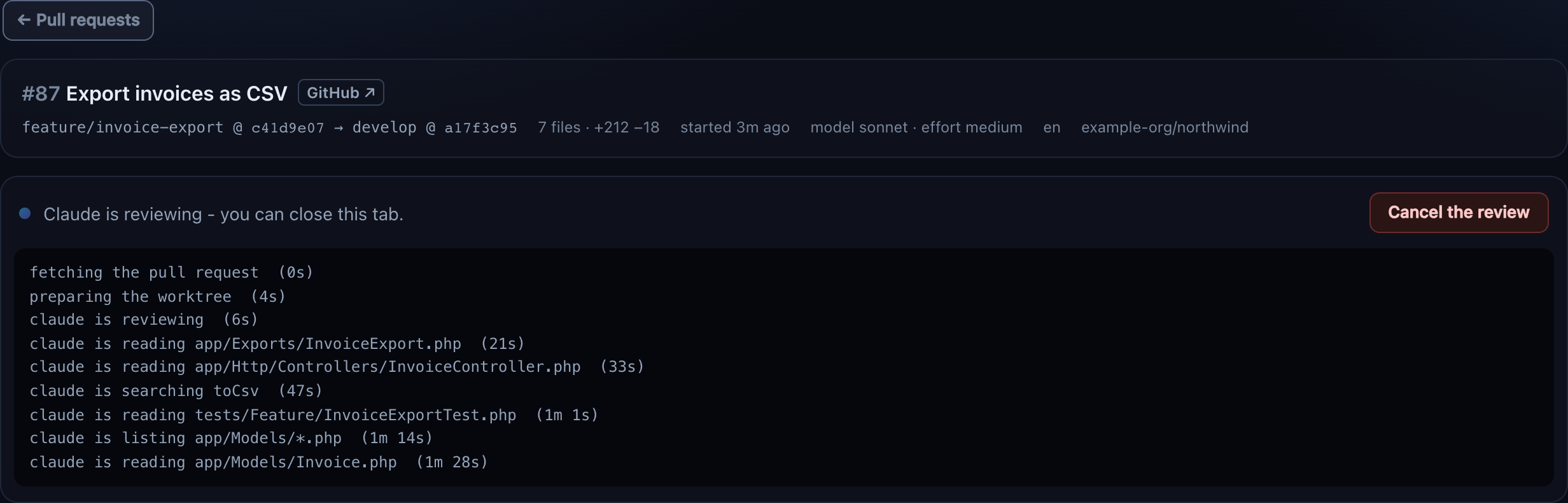
The bar on top says what the review was about, even after the pull request moved on: the pull request with a link to it on its forge, source @ head → target @ merge base, its size, when it was reviewed, the model, effort and profile it ran with, the languages and the repository. When the pull request has commits the review has not seen, it says so, and the findings are placed again when posting.
While it runs, the tab shows Claude's progress and Cancel. You can close the tab: the review is a job on the server and carries on, and the tab picks it up again when you come back. A review running in a terminal shows here too, with its progress in that terminal. An interrupted review offers Run again; a failed one shows the reason and Claude's raw answer, and nothing from it can be posted.
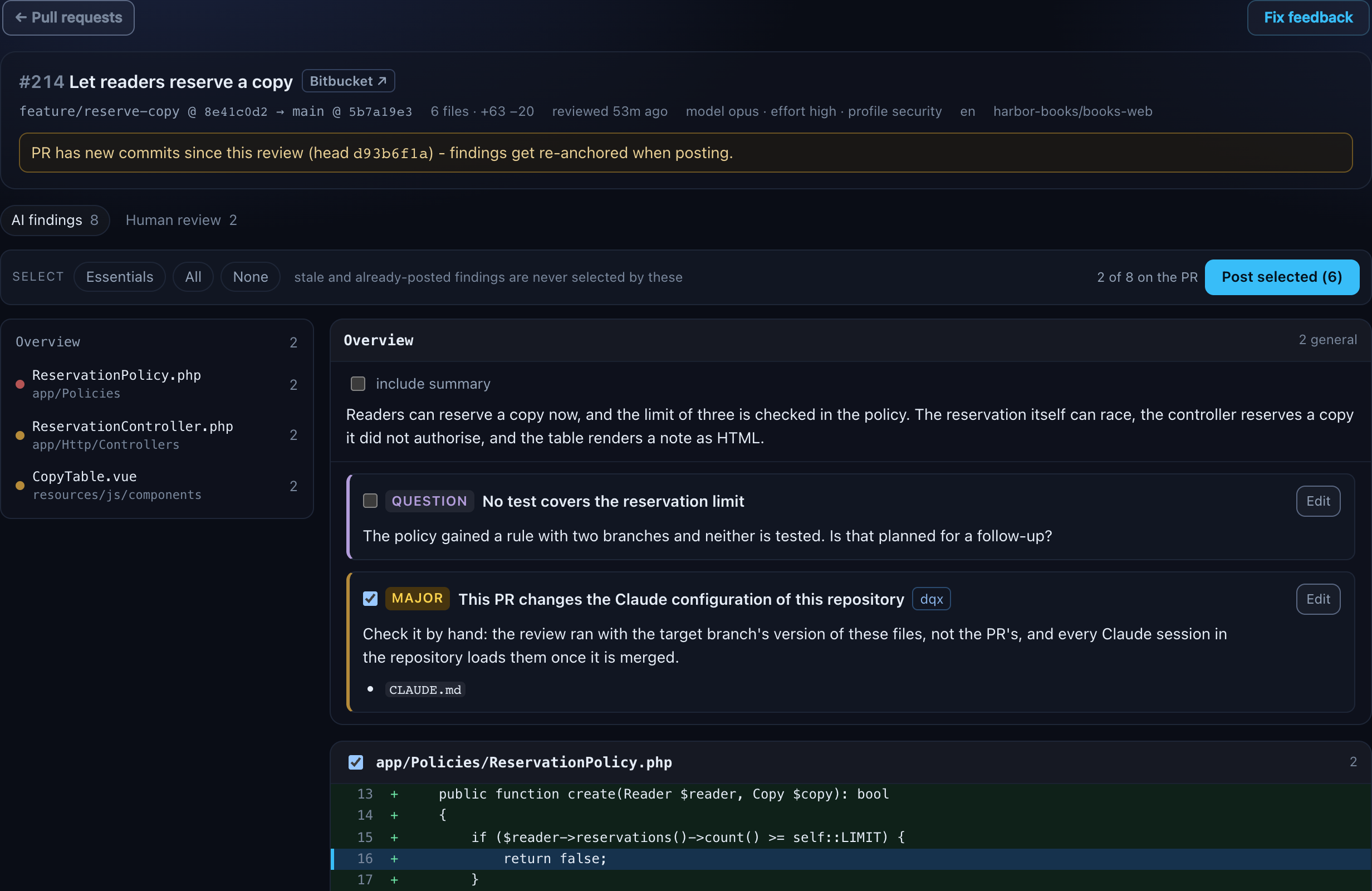
The findings come as a diff view:
- An Overview card first: Claude's summary and the findings without a line in the diff.
- Then one card per file, the most important first: the highest severity, then the number of findings. Each finding sits under a few lines of the diff around it,
+and-coloured, with show more for the whole hunk. - On the left, the file list stays in view: the path, the count and a dot in the colour of the worst finding. Click to jump.
Markers on a finding: stale when the pull request moved and its line could not be found again, with was line N @ commit saying where it was; already on PR when its comment is on the pull request; posted once this review posted it; dqx for the finding dqx adds itself when the pull request changes the Claude configuration; and edited once you changed it.
Choosing what to post
A checkbox per finding and one per file. Essentials (blockers and majors), All and None set the lot, and a review opens with Essentials ticked. The buttons never tick a stale or already-posted finding; the dqx finding they do.
A stale finding can be ticked by hand: it is then posted as a general comment with its old line, never inline on a guess. A finding already on the pull request cannot be ticked at all.
Claude's summary goes out only when include summary is ticked.
Editing
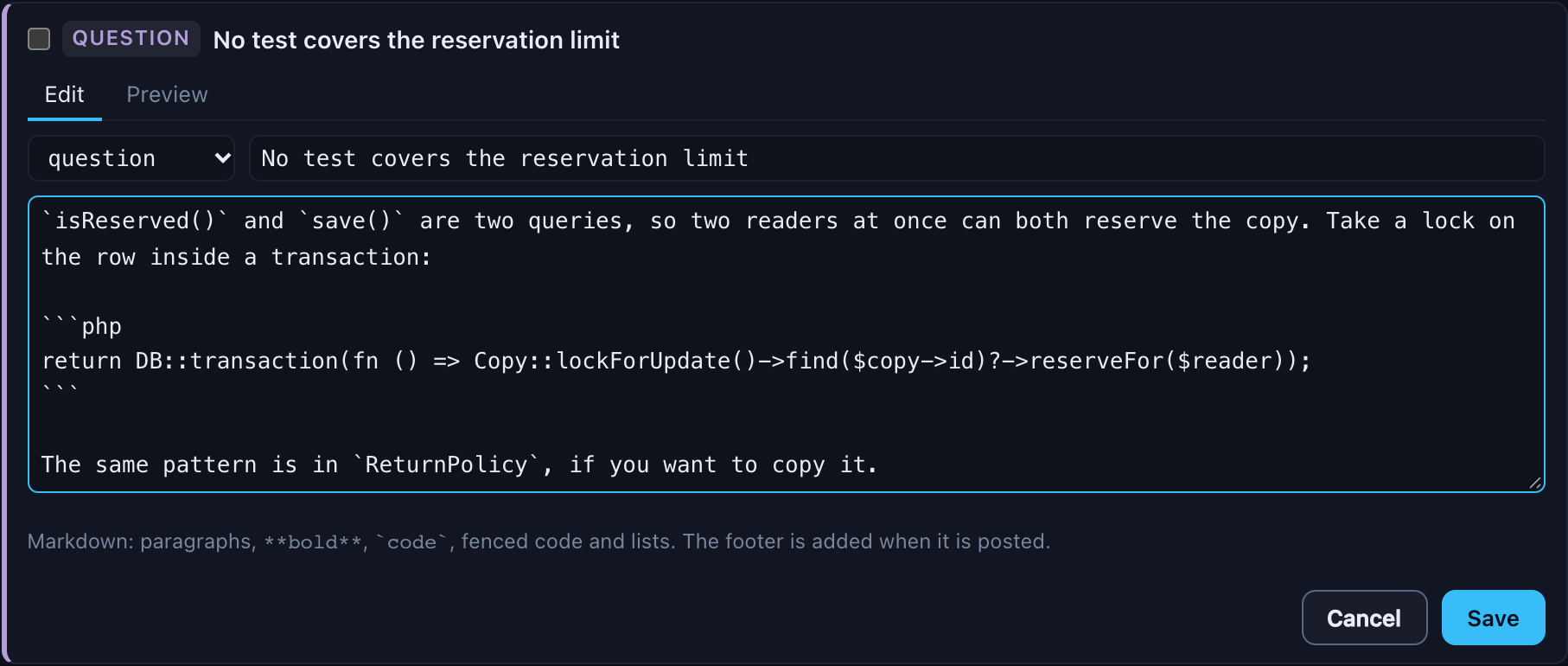
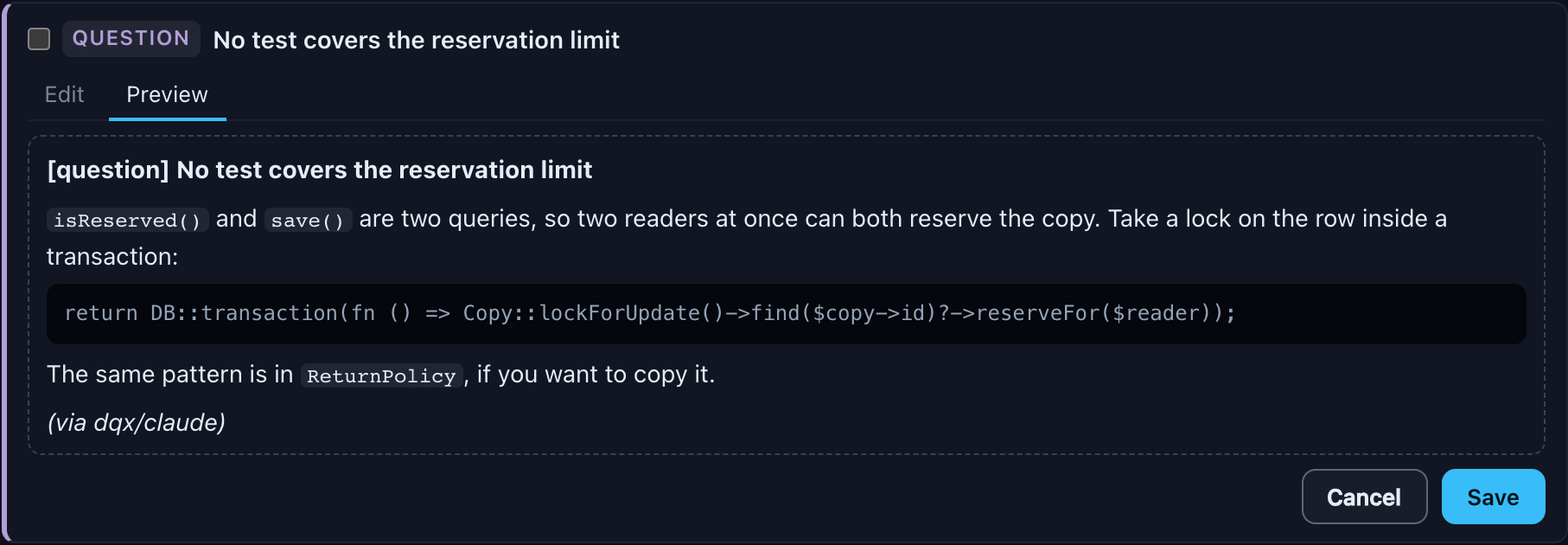
Edit on a finding opens its title, body and severity. The body is Markdown: paragraphs, bold, code, fenced code and lists. Preview shows the comment as it will land on the pull request: the severity label, the title in bold, the body and the footer. Saved at once, so a reload or a colleague's terminal sees the edit. Reset to Claude's text brings the original back.
Posting
Post selected (n) asks once, naming the count and the pull request. The comments appear under your own name, each finding ending with (via dqx/claude), and everybody on the pull request is notified. Comments you wrote in the human review go out in the same post, without the footer. When the pull request moved since the review, the dialog says the findings are placed again first, and that one that cannot be placed is left out.
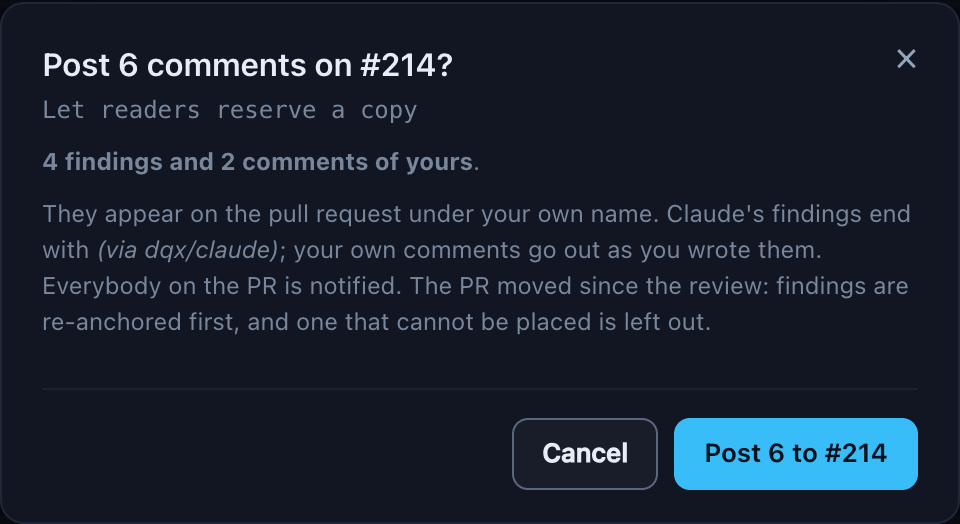
Afterwards a list says what was posted, each with a link to its comment, what was skipped and why, and anything the forge refused, with Open the pull request ↗ under it. On Bitbucket that is a comment per finding; on GitHub one review. What was posted is remembered, so posting again from the same review skips it.

A read-only dashboard (--read-only) shows pull requests and reviews but cannot start, cancel, edit or post, and does not store a token: those spend plan usage or write to the pull request.
Human review
Claude catches a lot, but not what takes knowledge of the business: whether a reservation should be possible at all, or whether a rule matches what the client asked for. That part is yours, and the forge makes it harder than it needs to be. Bitbucket and GitHub list the changed files alphabetically, so a change that runs from a Vue page through a controller to a policy is scattered over the list, and you rebuild the call order in your head.
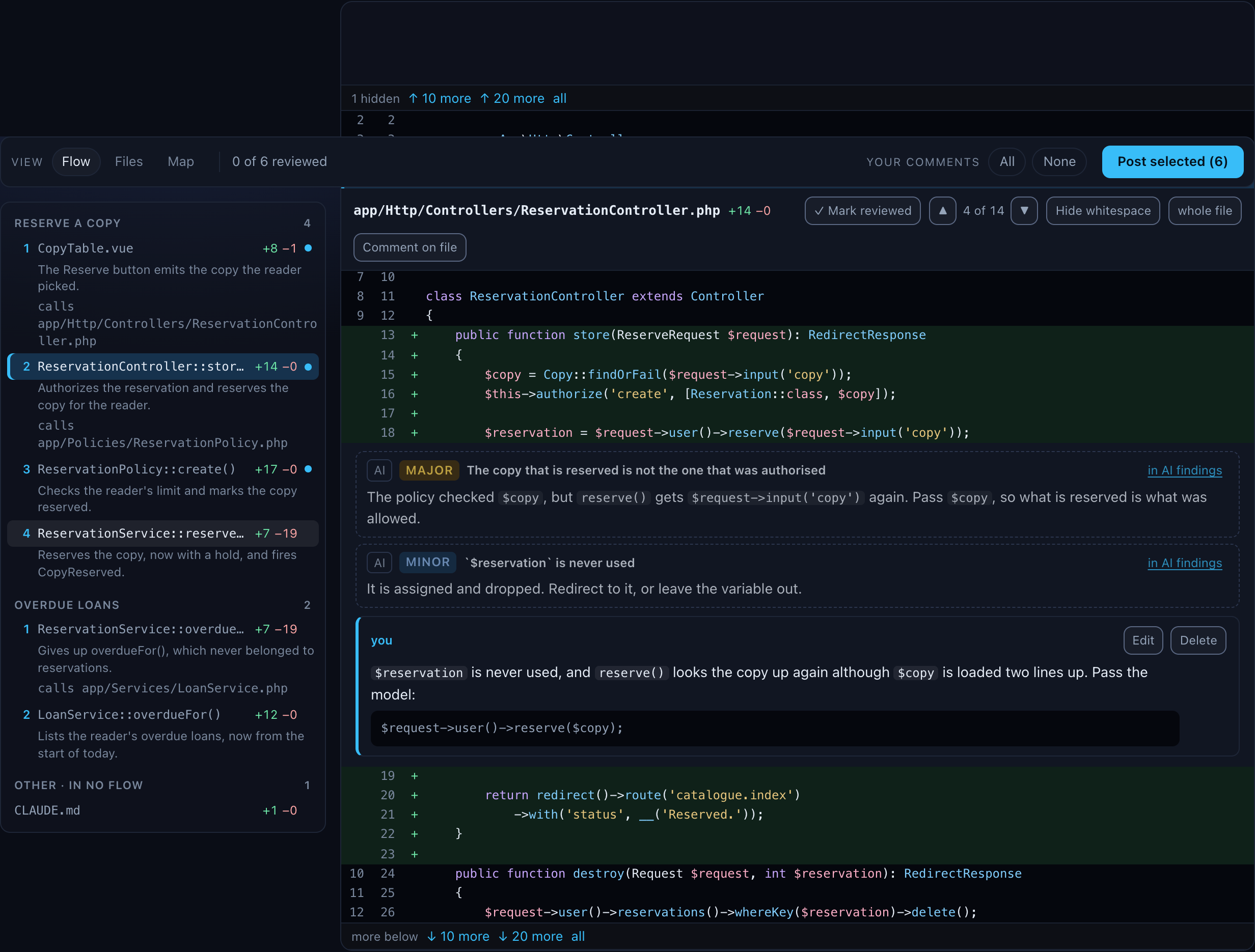
The human review shows the pull request the way the change runs: file by file in the order the code calls it, with the context you ask for around every change, and your own comments on any line, with a code change drafted by Claude when you ask for one. They go out in the same post as the AI findings you kept.
Starting it
- From the pull requests page: Human review on a row. No Claude run, and no consent question: nothing goes to Claude unless you map the flows or ask a ✨ trace later.
- On a finished AI review: the Human review tab beside AI findings. Both tabs share one pull request, one head and one post, and the AI findings show in the human review too, dimmed, with in AI findings to jump to their card.
The tab is part of the address (&mode=human), so a reload or a bookmark comes back to it.
Three views: Flow, Files and Map
View: Flow · Files · Map in the toolbar switches between three ways to read the same review. They share everything else: your comments, the Your comments panel, Suggest with AI and the one post. Your place, the file and the change you are on, carries over when you switch, and a comment you are still writing stays open. Which view you used last is remembered per project. Until you pick one, a pull request opens in Map, or in Flow when it changes three files or fewer: a map of three files adds little.
- Flow and Files put a list on the left and the diff on the right.
- Map draws the pull request as a change map on top, with the diff below it.
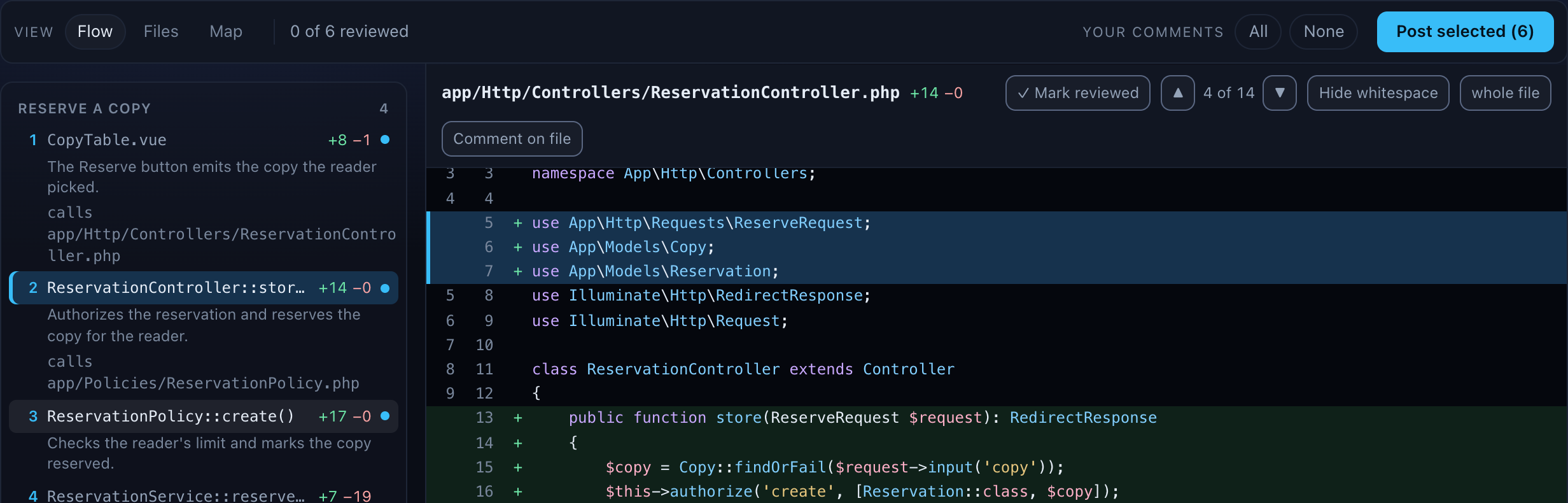
Flow puts every changed file in a layer at once, from its path and name, with no Claude involved: Foundation (migrations, seeders, models, enums, config), Domain (services, actions, jobs, events, policies, mail), Entry (routes, controllers, requests, commands, Livewire, Filament, Nova), UI (views, Vue, JavaScript, CSS), Tests and Other. That is the reading order until the flows are mapped.
Once they are, Claude's flows come first: each a name (Reserve a copy) with its steps numbered in call order. A step is a changed file, labelled with a method when Claude named one (ReservationController::store()), with a line on why it is in the flow and the files it calls. The calls are text to read, not links: only the step's own file is checked against the diff. A file no flow mentions stays under its layer, marked in no flow, so nothing in the pull request is ever out of reach. The map is a reading aid, not a verdict: when the order looks wrong, the why says what Claude thought.
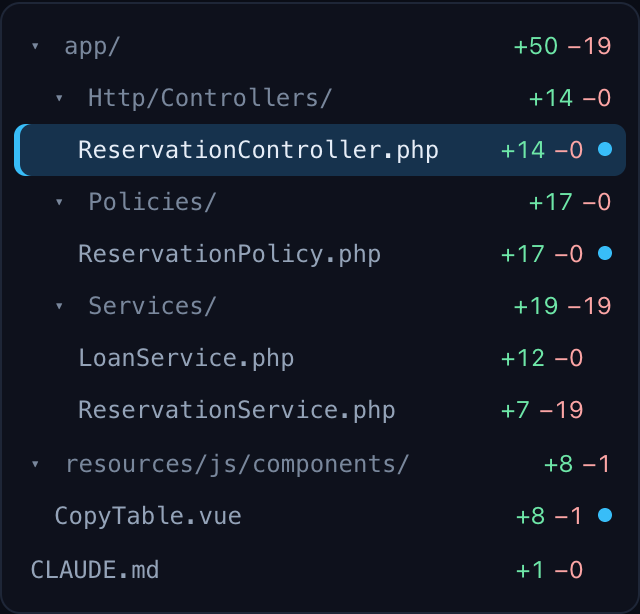
Files is the directory tree, alphabetical, with +12 −3 per file and summed per folder, and a dot on a file that has comments, yours or Claude's. A folder folds with a click.
Clicking a step or a file opens it on the right at its first change. n and p (or ▲ and ▼ beside the count) go to the next and previous change, across files in the order of the pane, so 4 of 8 counts through the whole pull request and two keys read all of it.
Mapping the flows
Map the flows in the Flow view asks Claude to order the changed files into flows. It is one Claude run with the same isolation as a review: read-only tools, no MCP servers and the pull request's Claude configuration restored to the target's. It sends the same code, so the first time for a repository it asks the same consent question in the pane, with Confirm and map.
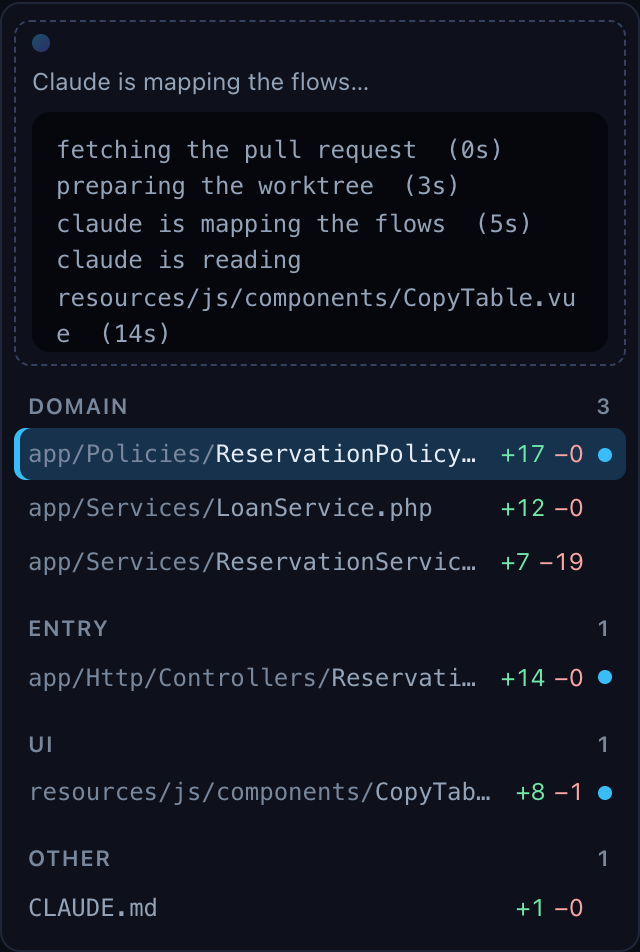
The map is kept with the review, for the head it was made on. When the pull request moves, the pane says the map is of an older head, the files that changed since sit in their layers, and the button reads Map again. A project can also have every review bring its map along: mapFlows: with-review.
Reading the change map
The Flow view is a list, so you still build the picture in your head: which step feeds which, where two flows share a file, where a value comes from. Map draws that picture. It comes from the same Claude run that maps the flows, so there is no extra run and no extra consent.
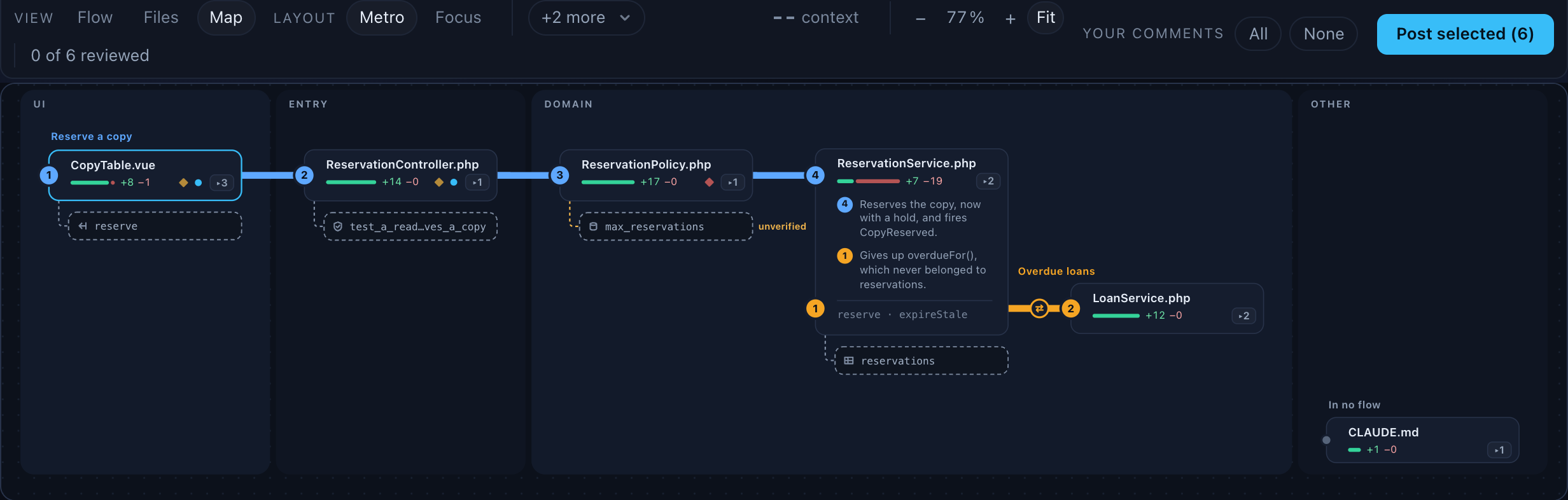
Lines and stations. Each flow is a coloured line, and each changed file on it is a station, numbered in call order. A file in two flows is an interchange: one tall card that both lines run through. The background bands are the layers, from UI through Entry and Domain to Foundation, and a station that sits outside its layer's band says its layer on a chip. A file in no flow sits in a quiet row at the bottom. The legend in the toolbar names the lines; click one to fade that flow. Flows that do not fit on its one row are under +n more, with their full names.
A card shows the file's name, a bar of added and removed lines, a dot for your comments, a diamond in the severity colour for an AI finding, and ▸n when it has n changed methods. Hover it for why it is in the flow. Click it to open its diff below.
Zooming. A big pull request makes a wide map, and Fit shrinks it to the pane's width, down to 75 %, and pans from there. When the text gets too small to read, zoom it like a page: − and + in the toolbar, or the slider on a wide screen, go from 50 % to 200 %, and clicking the percentage goes back to 100 %. With the pointer over the map, ⌘/Ctrl +, - and 0 zoom the map instead of the page, and so does ⌘/Ctrl with the wheel or a trackpad pinch, around the pointer. Anywhere else those keys zoom the page as usual. A zoomed map pans both ways, the selected station stays in view, and the level is kept per project until you press Fit again.
Arrows. Claude also says how the stations relate: calls, dispatches, listens, reads, writes, renders, routes, queries, configures, tests, and moved for code that dqx itself saw move. To keep the map calm, an arrow between two stations next to each other on a line is folded onto the line, as a small icon. The others show when you select a station: then its arrows are drawn with their labels, its neighbours stay bright and the rest fades. Arrows run through the gaps between the cards, never across one. An arrow whose other end is off screen stops at the map's edge in a chip that names it, such as → InvoiceService.php; click the chip to go there.
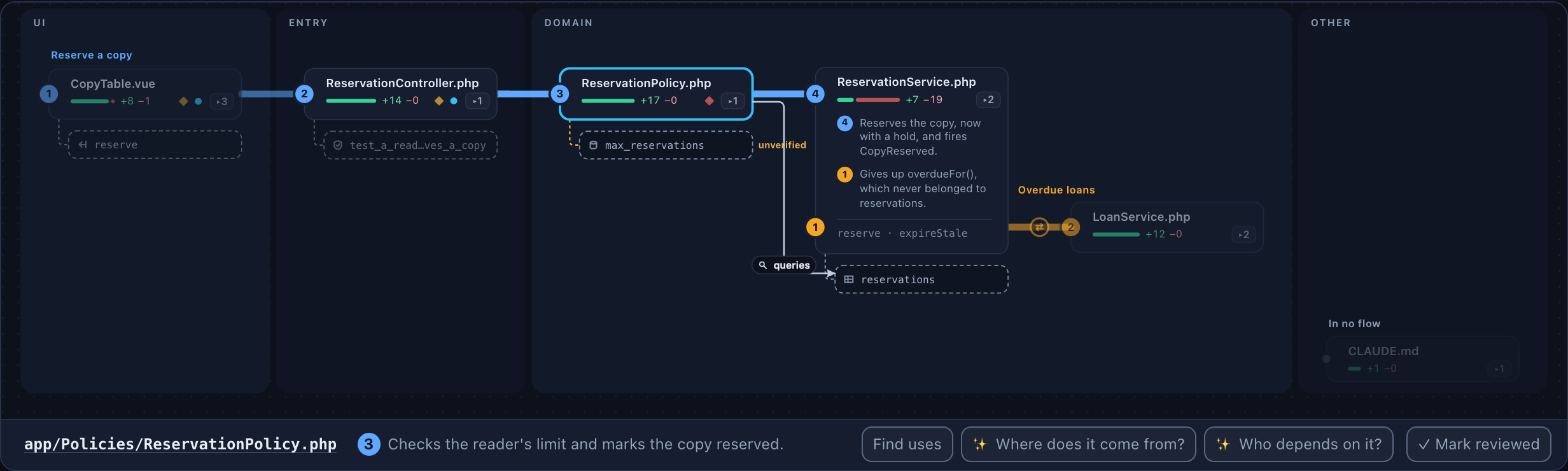
Every arrow is checked against the code. dqx looks for the name the arrow points at with git grep, at the pull request's head, in the file the arrow starts from. When it cannot find it, the arrow is dashed and marked unverified. That does not mean Claude is wrong: a call through $this->service->… can hide the name. It means dqx could not confirm it, so read that line yourself. Click an arrow to jump to the line it starts from, with a chip that opens the other end.
Methods. ▸n on a card opens the file into its changed methods, and arrows then attach to the method they name. Claude names the methods; when it names none, dqx shows one station per changed block instead, such as lines 40-52.
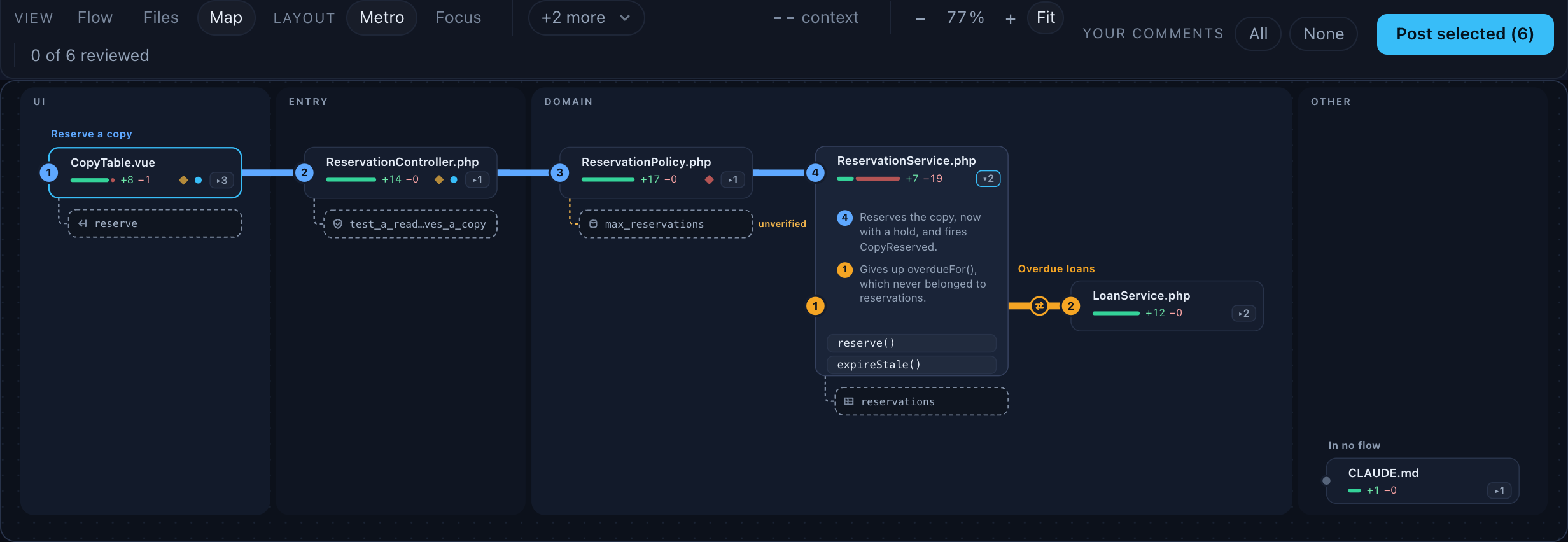
Context stations. Some unchanged code matters for the change: where a value comes from, a config key, another caller of a changed method, the test that covers it. Claude names up to twelve such places, and they hang under their station as small dashed satellites, each with its role: data origin, caller, consumer, schema, config or contract. Click one to read it in the diff's place: the named lines, highlighted, with ten lines around them, and Claude's reason above. It is read-only, because the forge cannot anchor a comment outside the diff. Back to the diff or Esc goes back to where you were.
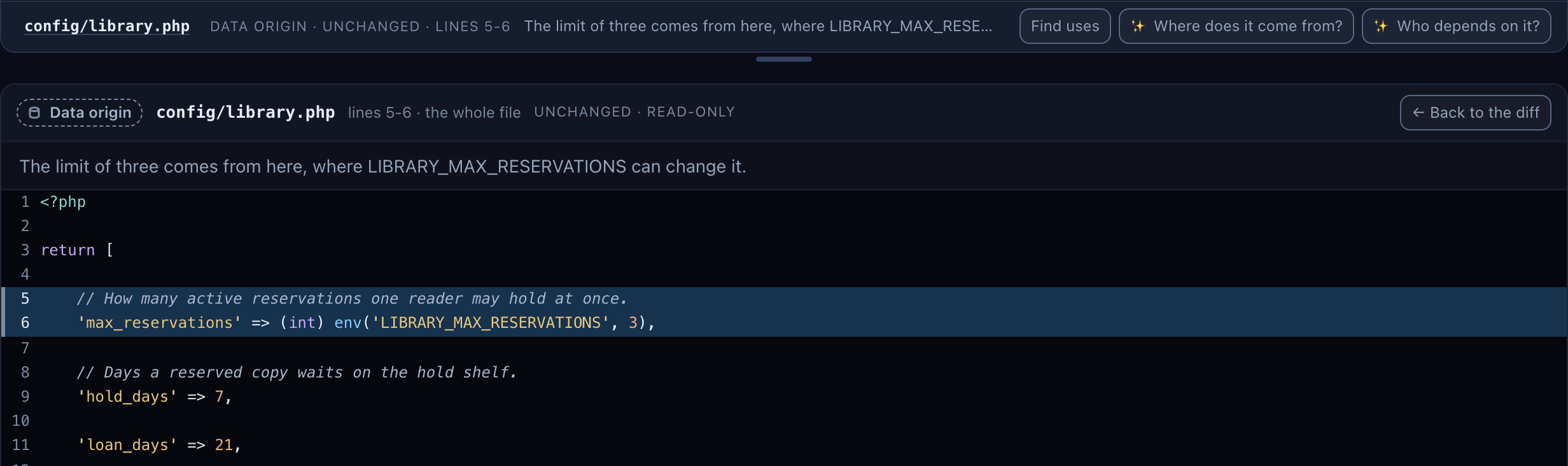
The panel reads from your own checkout, and only a path the map named and dqx found at the pull request's head. Secret files, such as .env or a key, are never shown, whatever the map says.
Focus on one station. The metro map shows the whole pull request; sometimes you want one file and everything around it. Layout: Metro · Focus in the toolbar switches. Focus puts the selected station, or the file you are reading, in the centre and sorts the rest into columns by how they relate to it:
- Comes from, on the left: where things come from. What calls it, the data it reads, the config it takes, the step before it in the flow.
- Depends on it, on the right: what it calls, the events it dispatches, what it writes, the tests that cover it, and whoever reads or listens to it.
- Further back and Further on, one step further out on each side and faded.
An empty column is left out, and a full one ends in +n more; click it to open the rest. The arrows and context stations are the same as in Metro, only the centre's own arrows keep their labels.
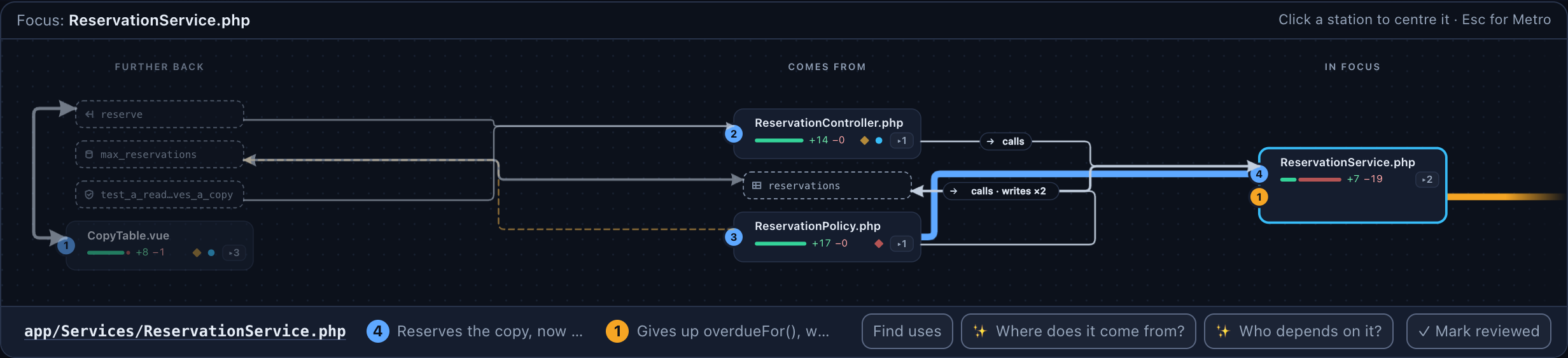
Click any station to move it to the centre, with a short glide, or none when your system asks for reduced motion; n and p do the same for the next and previous file. The line above the map says Focus: ReservationService.php, and once you have moved on, ← back returns to the station centred before it. Esc goes back to Metro with the station still selected. Which layout you used is remembered per project.
Following a thread
A selected station has three questions in the bar under the map.
Find uses searches for one word with git grep, at the pull request's head, on your machine. Select a word in the diff or the context panel first; without one it looks for the method's or the file's name. The hits come as a list, at most 30, with secret files left out. A hit in a file of the pull request opens its diff. Any other hit you can add to the map, as a caller or a consumer: it becomes a context station with a checked arrow.
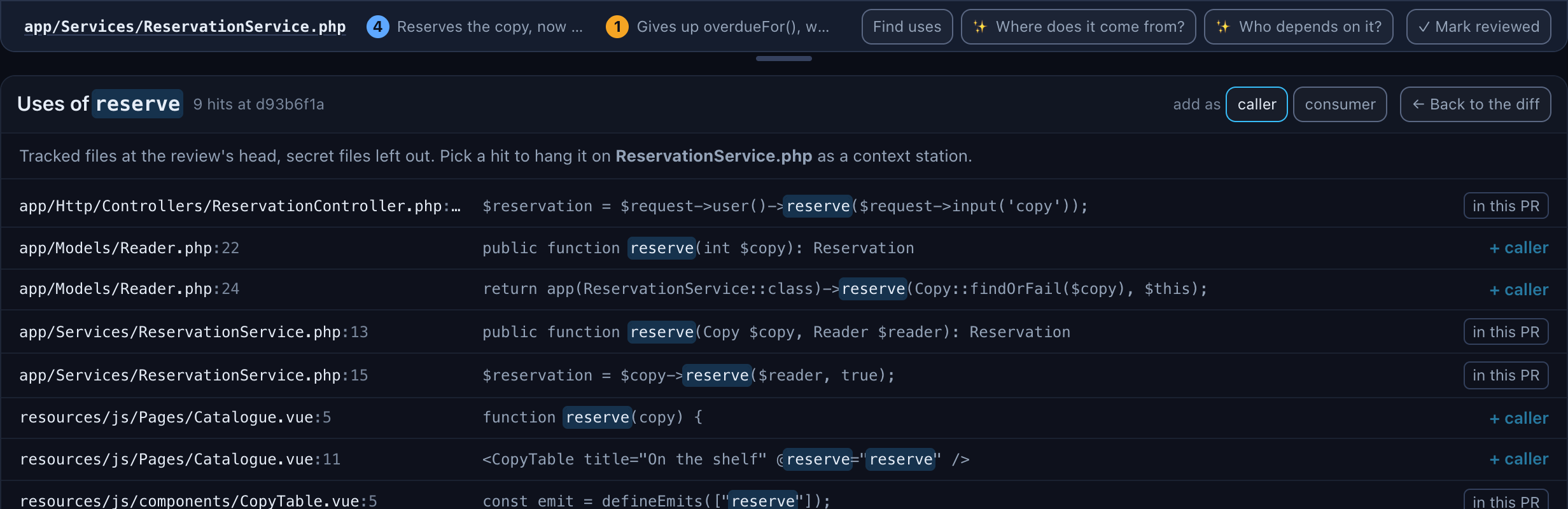
✨ Where does it come from? and ✨ Who depends on it? ask Claude that one question about the station. It is one quick run, with the profile in suggestProfile, and the same isolation as the map: read-only tools in a worktree. Claude answers with up to five context stations and arrows, which are checked like the others and added to the map. A bar counts the seconds, with Cancel, like Suggest with AI.

Reviewed. Press r, or Mark reviewed, to mark the current file as read. The card gets a check and fades a little, Flow and Files show the mark too, and the toolbar counts 4 of 9 reviewed. The marks are yours: they stay on this machine and are never posted. When the pull request moves, the marks of the files that changed are cleared.
Keys. Click a station, then use the arrow keys to move along the lines and arrows, Enter to open a station, m to open its methods and Esc to clear the selection. n and p go through the changes in step order, as in Flow, and the map follows. z folds the map to a thin strip while you read the diff; press it again, or click the strip, to open it. Drag the divider to give the map more or less room; its height is remembered per project.
What goes to Claude. The map comes from the map run, which sends what a review sends, under the repository's consent. Each ✨ trace is one more run under the same consent, and the first one for a repository asks the question first, with Confirm and trace. The arrow check, Find uses, the context panel and the reviewed marks never leave your machine.
A pull request with more than 40 files in flows starts with one pill per flow, with a count of its arrows; click a pill to draw them and click it again to open that flow. Files in no flow are never folded into a pill. A map made before arrows existed shows its stations without them, and Map again for arrows under the map asks for a new one. Before the flows are mapped, the map shows every changed file in its layer's band, in path order, without arrows, with Map the flows in a banner above it.
The right pane
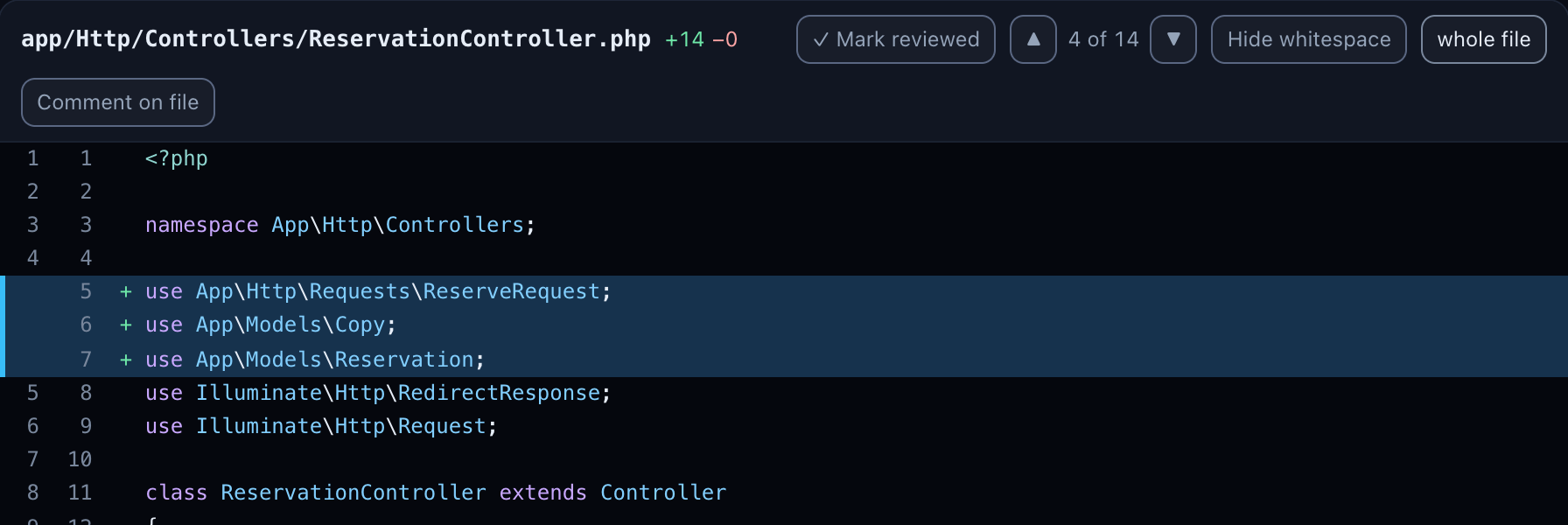
The diff of one file: the hunks, added lines green, removed lines red, context plain, with syntax highlighting for PHP (Blade included), JavaScript and TypeScript, Vue and HTML, CSS and SCSS, SQL, JSON, YAML, Markdown and shell scripts.
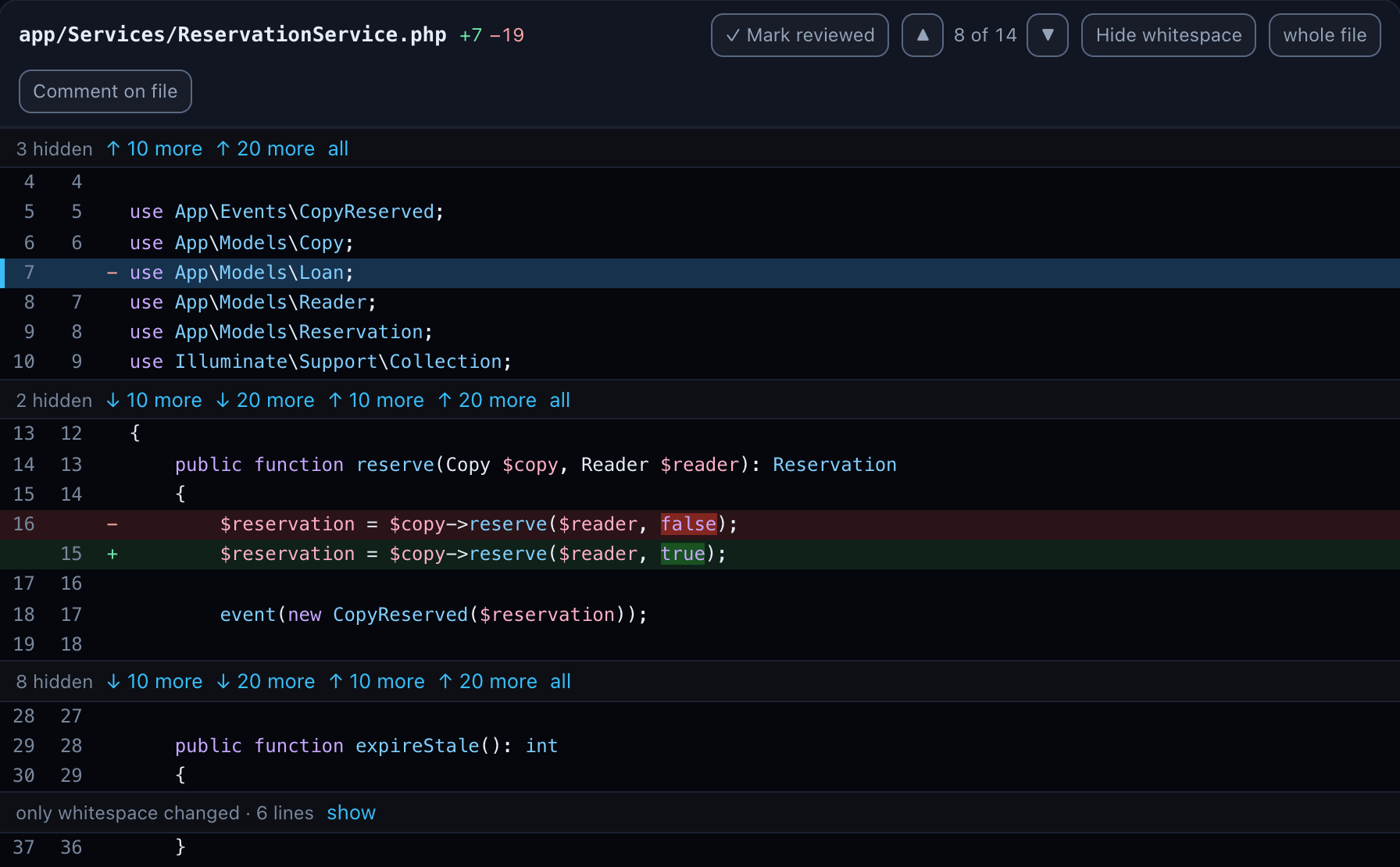
Between the hunks, a row says how many lines are hidden, with 10 more and 20 more in both directions and all. fewer folds what you opened back up, per gap or, in the file's header, all of it. A gap that is used up joins the two hunks.
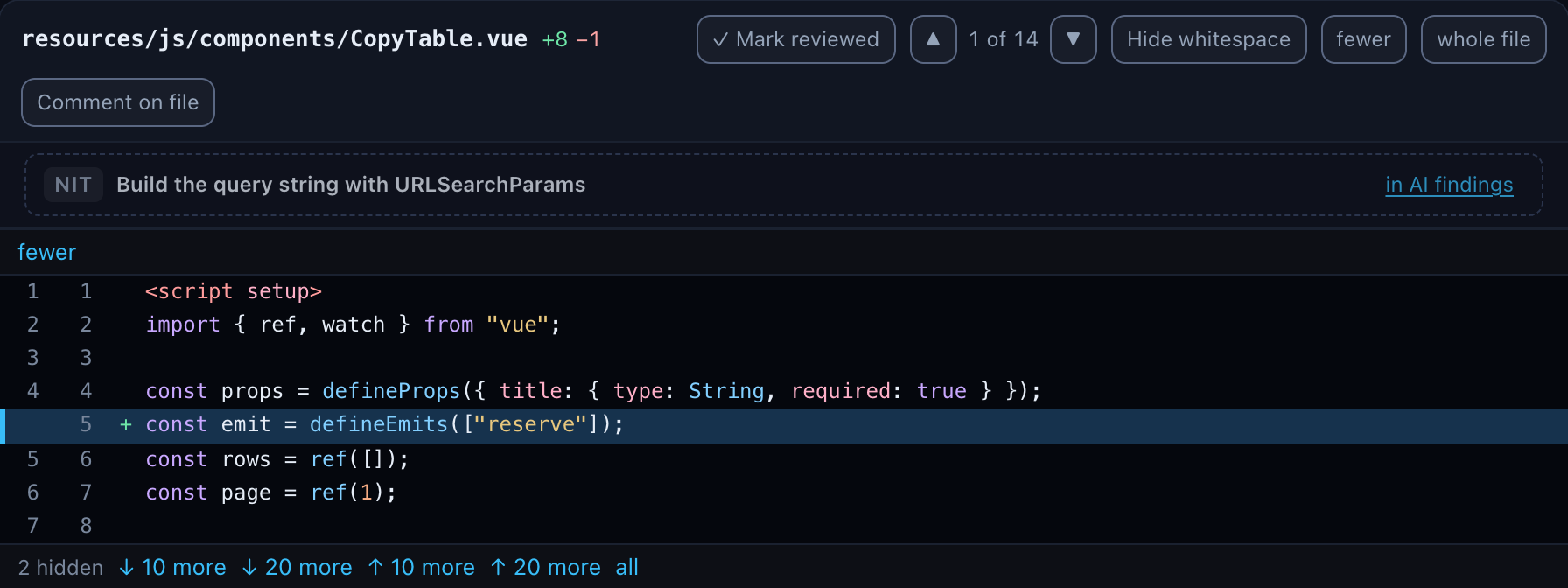
whole file shows the file at the pull request's head, every line, with the changes marked where they are. The file is read from your own checkout at the review's commit, never from the network, and only for a path that is in the diff.
Reading the diff
Three things make a change quicker to read. All three are worked out on your machine, from the diff dqx already has; nothing goes to Claude.
Changed words. When a removed line is followed by the line that replaced it, the words that differ get a stronger shade of the row's colour on both, and changed words with only spaces between them are shaded as one run. A one-argument change then reads as one word, not as two whole lines to compare by eye. A line gets no marks when it has no partner, when it is very long, or when most of it changed: then the whole line is the change, and marks would only be noise. The excerpts of the AI findings are marked the same way.

Whitespace. A hunk that only changes indentation or spacing folds to one row, only whitespace changed · 6 lines, with show to open it. Hide whitespace in the file's header does the same for single lines inside a real change: a line that only moved whitespace is shown once, as its new line with a ≈, and n and p skip it. Which you chose is remembered per project.
Where whitespace means something, in YAML, Python and Markdown files, a Makefile, .editorconfig and .env.example, nothing is folded and the button is off, with a tooltip saying why: there a change of indentation is a real change.
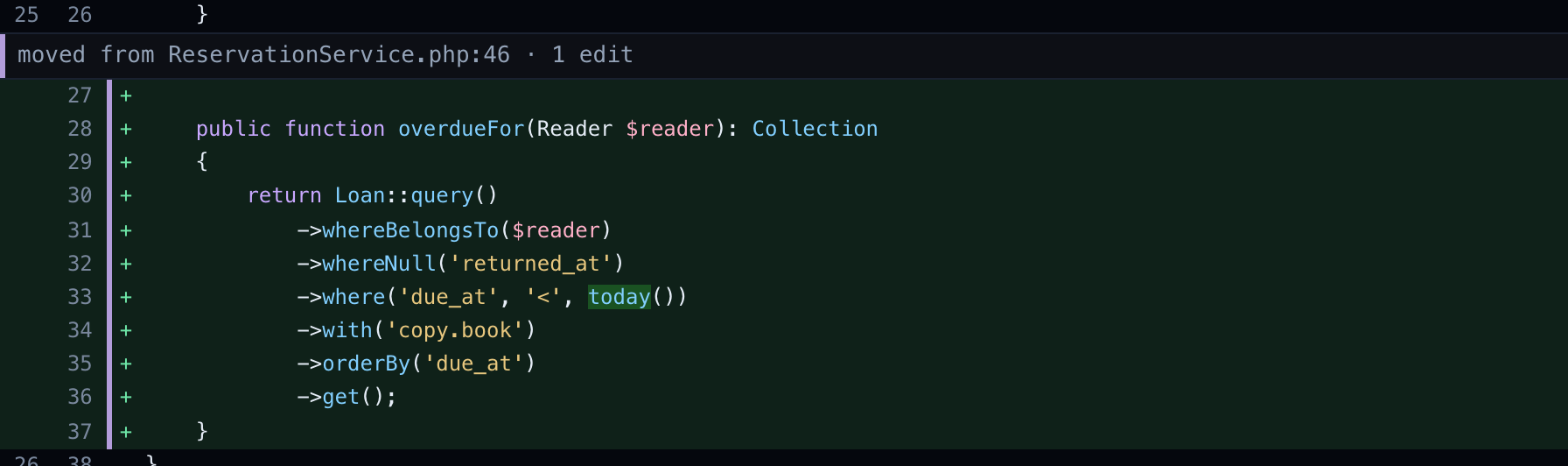
Moved code. A block of three or more lines that moved, within a file or to another one, is shown as a move rather than as a deletion and an unrelated addition. A bar in the gutter marks both ends. The old place folds to one row, 11 lines moved to LoanService.php:27, with show, because the block is read at its new place. The new place is headed moved from ReservationService.php:46 · 1 edit, and the edits inside the block are marked like changed words, so a small change in a moved method is not missed. Click the heading to go to the other end, in the other file when needed. A block added twice is marked copied from instead. A pull request of over 20 000 changed lines is not searched for moves.
A click on a ≈ line opens both sides of it first, and a folded block opens with show, so a comment always lands on a line you can see and the forge knows.
Your own comments
Click a line (anywhere on it, its number, or the + that appears in the gutter on hover) to write a comment on that line. A click that ends a text selection does nothing, so copying code still works. Lines you opened as extra context, or see in the whole file, are for reading: Bitbucket and GitHub take comments only on the lines of the diff, so those lines are not clickable and say so when you hover them. On an added or unchanged line it goes on the new side; on a removed line, click the old number and it goes on the old side, so it lands on the removed line on the forge, never on whatever new line happens to have that number.
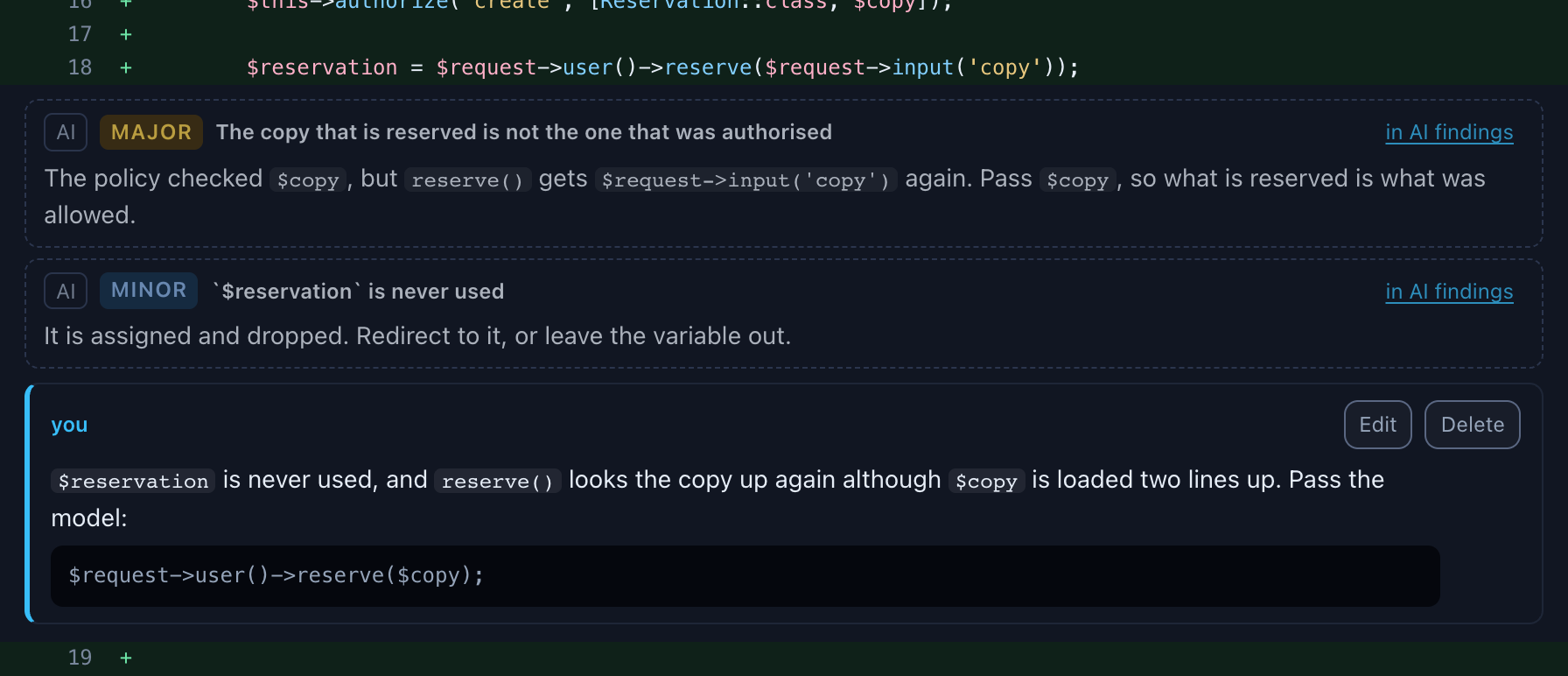
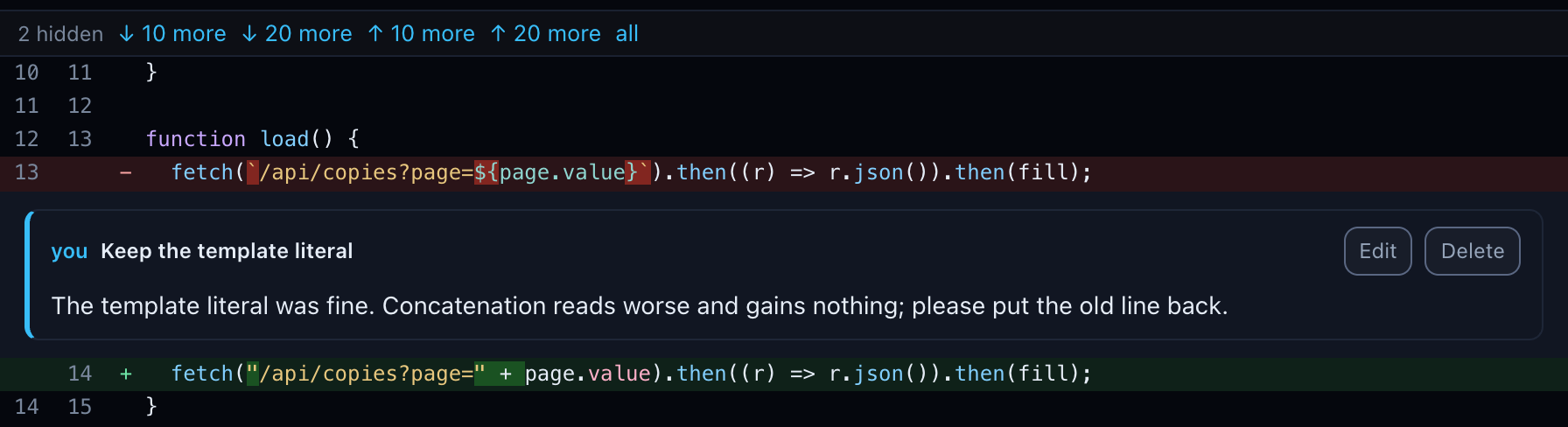
Comment on file in a file's header writes one about the file as a whole, and Comment on the pull request at the top one about everything. The editor is the same as a finding's: an optional title, a Markdown body with code blocks, and Write / Preview. The preview shows the comment as it goes out: the title in bold and your text, with no footer. The (via dqx/claude) line marks what a model wrote, and this you wrote yourself.
Every comment is saved at once. Your comments above the panes lists them all, each with where it is (ReservationController.php:18, CopyTable.vue:13 (removed)); a click goes to it. You can edit or delete a comment until it is posted; after that it is read-only and marked posted. When the pull request moves, your comments are placed again by the text of their line, like the findings; one that cannot be found is marked stale and, ticked, goes out as a general comment naming its old line.
Suggesting a change with AI
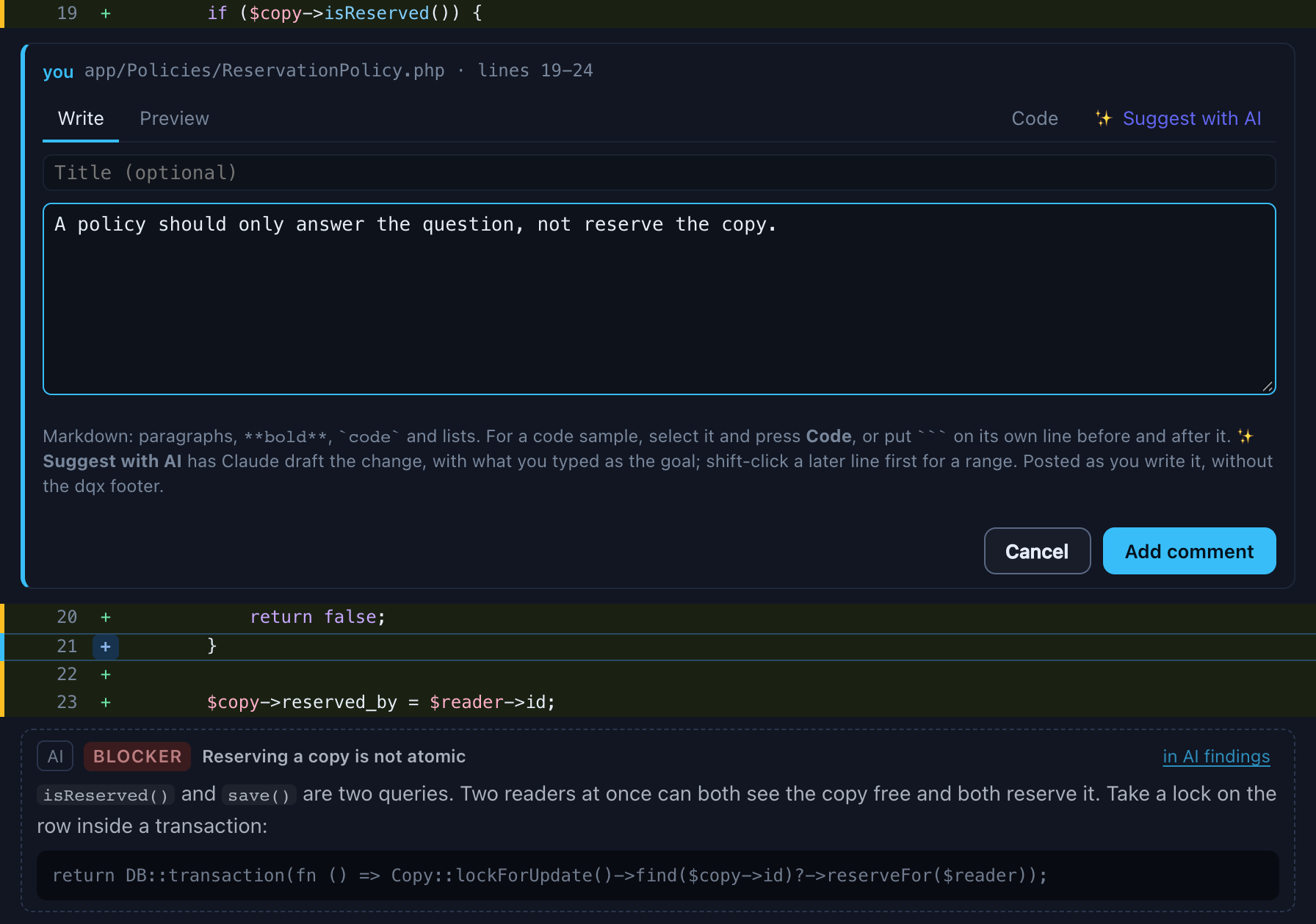
Sometimes the comment you want to write is the code itself. ✨ Suggest with AI in the comment editor has Claude draft it: a short explanation and the replacement for the lines you picked, filled into the editor for you to change, keep or throw away.
- Click a line on the new side (added or unchanged) to open the editor. The range runs from that line to the end of its block of added lines, up to 30 lines. Shift-click a later line of the same file to choose the end yourself; the range is highlighted.
- Optionally write what you are after in the body (make this atomic, two readers can reserve the same copy). Claude takes it as the goal; with an empty body it improves the lines as a careful reviewer would.
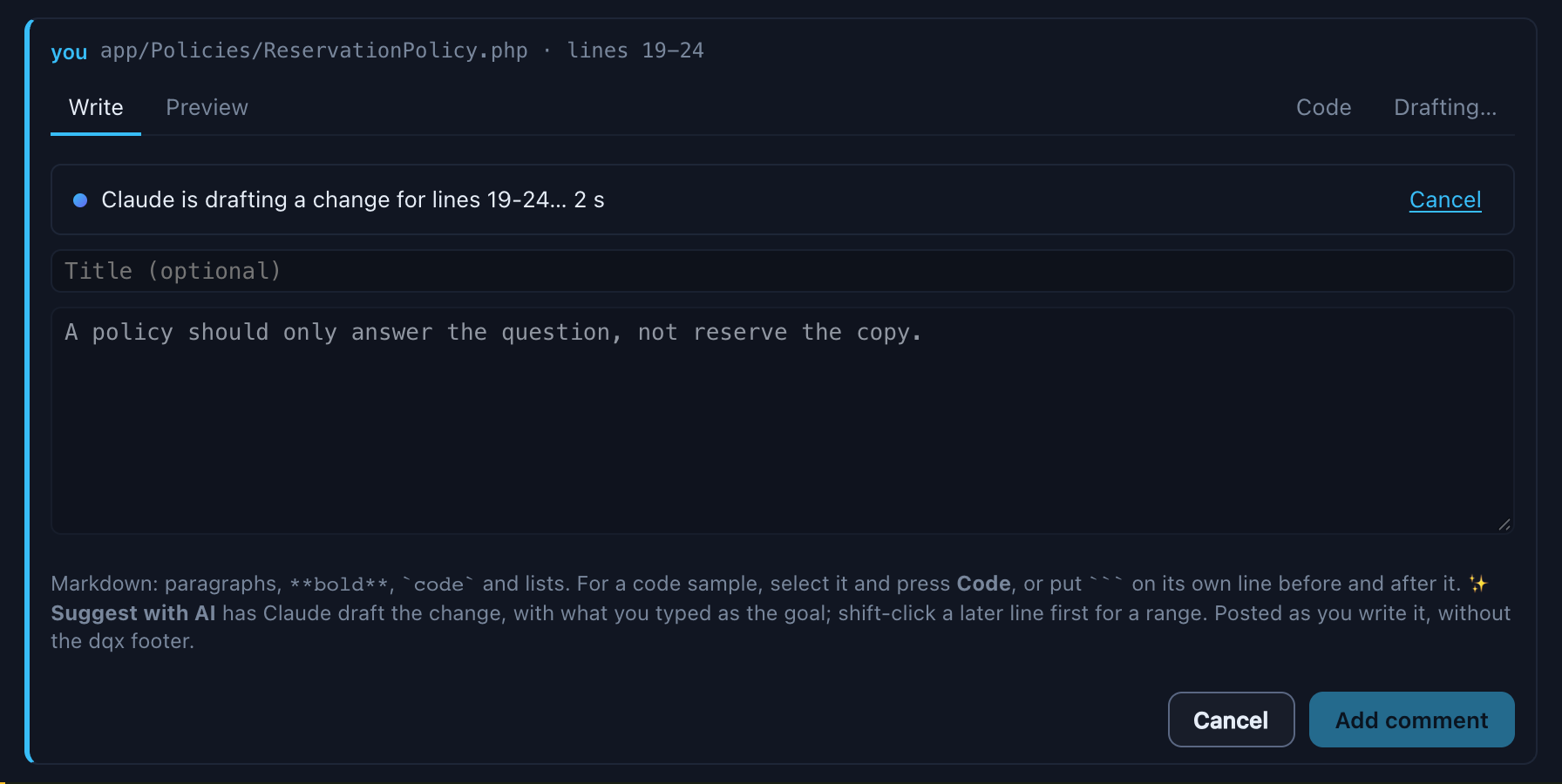
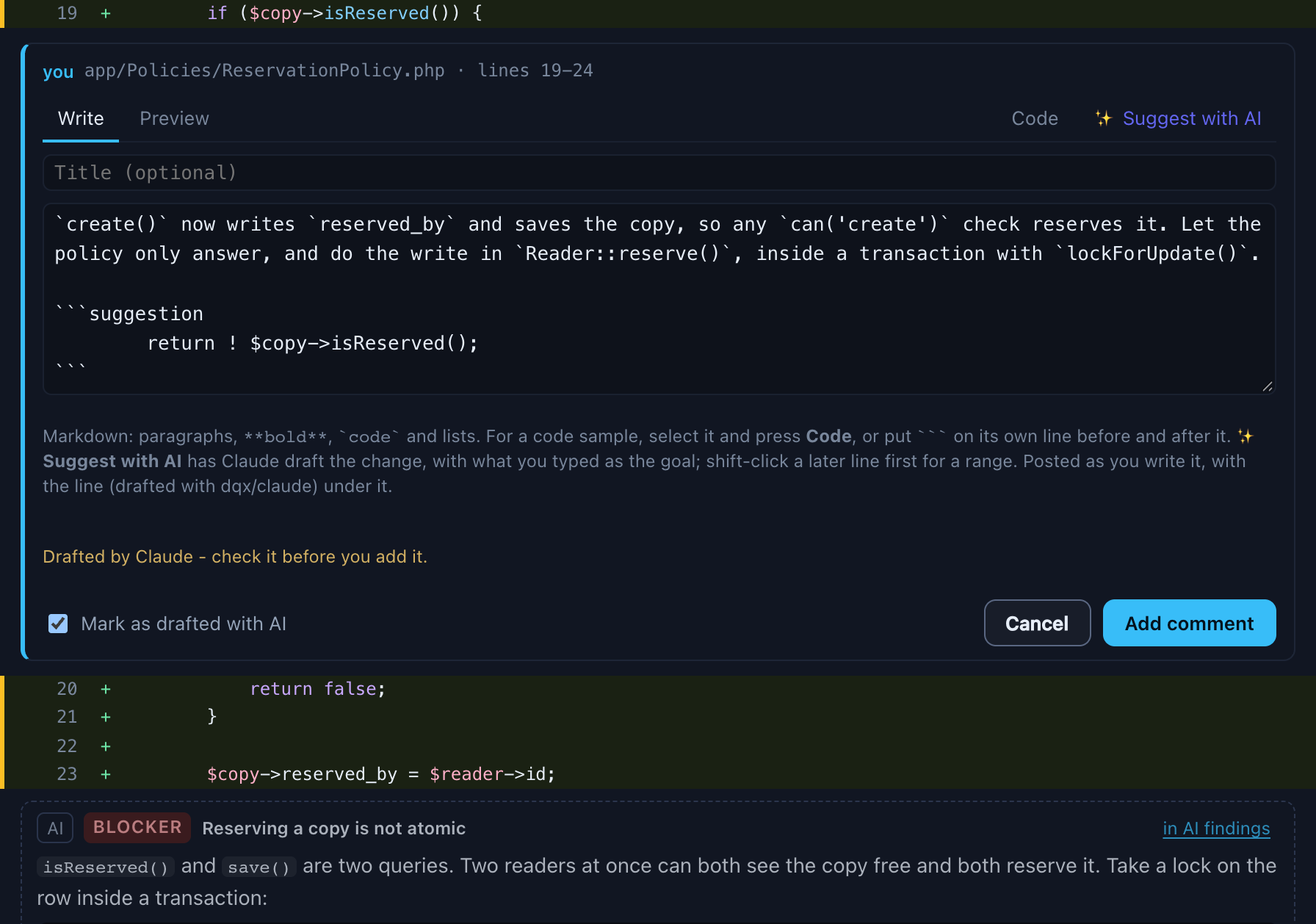
- Press ✨ Suggest with AI. A bar in the editor says Claude is drafting, and counts the seconds; Cancel there stops the run. After some seconds the editor holds the explanation, in the review's language, and a
suggestionblock with the new code, in the file's language. When it fails, the reason shows in the same bar.
Preview shows the old lines in red and the new ones in green above the comment as it goes out, and says what the forge makes of it:
- GitHub gets a real suggestion on the lines you picked, which the author applies with one click.
- Bitbucket gets the code as a normal code block, headed Suggested change for lines 17-19. Bitbucket Cloud's own suggestions work for one line only and their API form is not documented, so dqx does not guess it.
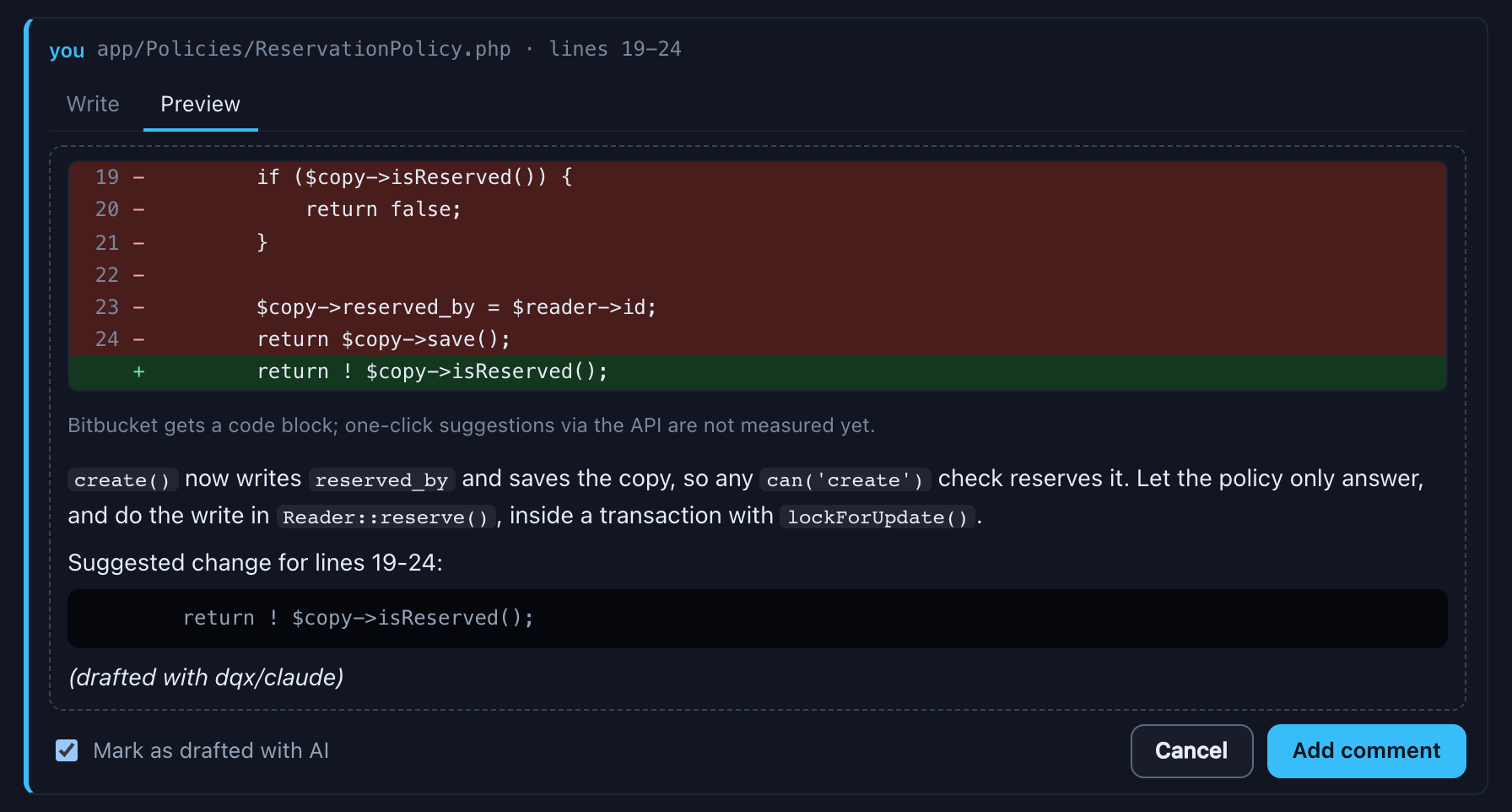
A comment you drafted this way is ticked Mark as drafted with AI, and goes out with the line (drafted with dqx/claude) under it, so the author knows a model helped. Untick it when you rewrote the text yourself. It is a different line from the AI review's (via dqx/claude): the comment is yours, drafted with help.
What Claude sees: the one file, at the pull request's head, read from your checkout, the picked lines and your goal. Nothing else: this run has no tools at all, so it cannot open another file, search the repository or run anything, and it starts in an empty folder, so no project settings or CLAUDE.md apply. It still sends code to Claude, so it asks the same consent question as a review the first time for a repository. The model and effort come from the profile in suggestProfile (settings), quick unless you chose another in the settings popup.
A range comment follows the pull request like any comment: when it moves, the range is found again by its first and last line, and when either changed, the comment turns stale and is not posted on a line.
Posting both
There is one post for the review. Your comments have their own checkbox in Your comments, with All and None, and a written comment is ticked by default; the findings keep theirs under AI findings. Post selected (n) in either tab counts both, and the confirm says how many of each go out. On Bitbucket every comment is posted on its own, on GitHub they are one review together with the findings. Editing waits while a post is in flight.
A read-only dashboard (--read-only) shows the human review with its comments and map, but cannot write, map or post.
Fixing the feedback
A pull request whose last review has findings or comments of yours gets a badge on its row, n open points · Fix. The count is dqx's own points, counted from the review without asking the forge per row, so your colleagues' comments are added once the panel opens. The review page has a Fix feedback button in its header and at the end of Your comments on every finished review of a pull request, since the pull request itself may hold the feedback. All three open the same panel. When there is none at all, it says "No open feedback on this pull request", and its Claude buttons stay off.
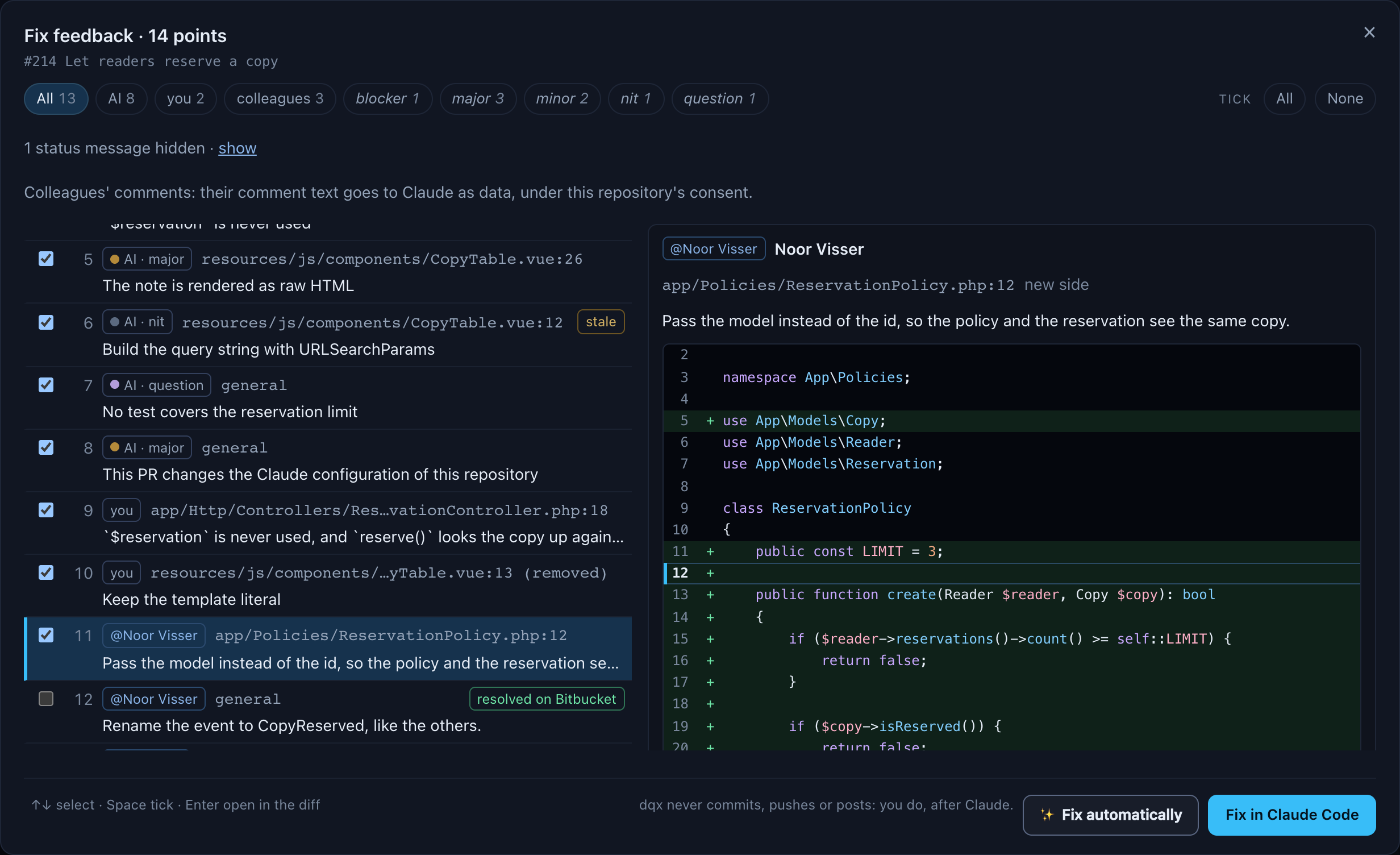
The panel is a list with a reading pane. Each row in the list shows where the point comes from (AI with its severity, you, or @author), its path:line, one line of its text and its state. A finding or comment of yours shows posted once it is on the pull request, and resolved on Bitbucket (or GitHub) when its thread was resolved there; a resolved one starts unticked. A colleague's point shows state unknown when the forge can't tell whether its thread is resolved.
A click on a row selects it, and the pane shows that point in full: its source, author, state (with who resolved it, when the forge says), the whole path with the line and side, and the text rendered as findings are, code blocks and suggestions included. Below it is the code: ten lines on either side at the pull request's head, highlighted, with the point's line or range marked and the lines the pull request adds or removes in green and red. A colleague's thread has its replies below, each with its author. Open in the diff closes the panel and shows the line in the human review, in whichever of Files, Flow or Map you had open. Open on Bitbucket (or GitHub) opens the comment there, and Tick or Untick changes its tick. On a window narrower than about 1100 pixels the pane unfolds under the selected row instead.
The keys: ↑ and ↓ move the selection, Space ticks the selected point, Enter opens it in the diff. The checkbox on a row ticks it without selecting it.
The chips above the list filter it: All, AI, you, colleagues, and the AI findings by severity, each with its count. A filter never unticks anything; when ticked points are out of sight it says so, "3 ticked points are hidden by the filter". All and None beside them tick every point the filter shows, or none of them.
Status messages from pipelines are hidden. A short general comment like "✅ All changed lines are covered - good job!" is left out of the list, with "1 status message hidden · show" above it. show lists them, unticked; hide leaves them out again and unticks them, so one only reaches the brief while it is shown and ticked. The rule, and review.ignoreAuthors for authors whose short notes you never want to see, are in the review guide. An inline comment or a longer review is never hidden, so an AI reviewer such as Rovo stays in the list. The ignore authors field on the This project tab of ⚙ review settings writes that key.
A note under the chips says what happens to colleagues' words: their comment text goes to Claude as data, under this repository's consent. When the pull request's comments can't be read (a missing token, gh not logged in), the panel says so and lists dqx's own points alone.
The brief Claude gets opens the brief as it is for the points ticked now, with its size. When some ticked points don't fit the cap, they are listed as over the cap. What goes into it, and what never happens, is in the review guide.
- Fix in Claude Code makes the worktree and the brief file, and opens Terminal with Claude Code in it, as
dqx review fixdoes. The first time for a repository it asks the consent question first. The panel then says Opened Terminal in and the worktree, with the command to copy. On a system other than macOS it gives the command to run. - Copy command gives
dqx review fix <pr> --points …for the ticked points, for a terminal of your own. - ✨ Fix automatically lets Claude plan and fix the ticked points in the background, on a branch of its own: see below.
A read-only dashboard (--read-only), and so the demo, lists the points and builds the brief but refuses Fix in Claude Code and every step of ✨ Fix automatically: they make a worktree and a file, start Terminal or Claude, or change your checkout.
Fixing it automatically
✨ Fix automatically works in two runs, and you decide between them. The first time for a repository it asks the consent question first, as a review does: the brief, with the pull request's code and your colleagues' comments in it as data, goes to Claude.
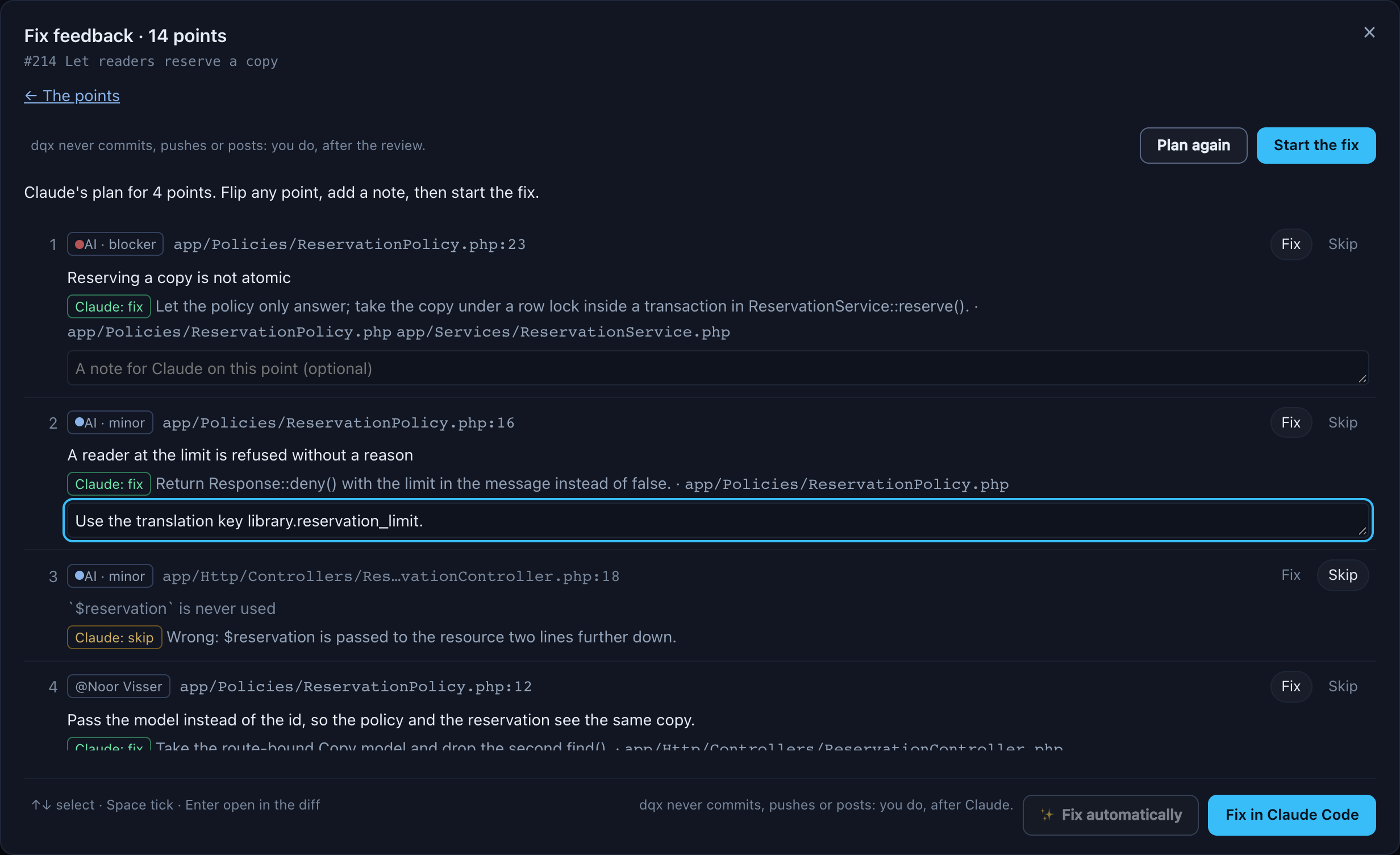
- The plan. Claude reads the code of every ticked point, read-only, at the pull request's head, and answers each one with fix and how, or skip and why. A bar shows the seconds and has Cancel.
- Your approval. The panel lists the plan per point: its source and place, Claude's proposal with its reason and the files it expects to edit, and Fix or Skip, which you flip as you like. A point to fix takes a note for Claude. Start the fix sends only the points you left on Fix.
- The fix. Claude edits a worktree of its own on a new local branch
fix/<pr>-feedback(or-2,-3when that exists), from the pull request's head. A second bar shows the seconds.
The run has Read, Grep, Glob, Edit and Write, nothing else: no shell, no git, no network tool. A hook refuses every read or write of a secret file and of any path outside the worktree, and deny rules keep Grep and Glob away from secret files too. When it is done, dqx checks the change before anybody is offered it: no secret file, nothing outside the repository, no symlink, no binary file, no lockfile a point did not ask for, and the diff under 200 kB. It also checks that your own checkouts came out exactly as they went in: the review's, the project root and each site's. A failed check fails the run with the list of what was wrong, and keeps the branch so you can see what it did; Discard removes it.
When the pull request moved since the plan, the fix refuses and the panel says The pull request moved since the plan was made: plan again.
The result is a review of its own. The panel says what was done per point, the diff stat and tests not run in the fix, with Open the fix review. That opens "Fix of #214" in the human review: Flow, Files and Map, the diff with its word marks and moves, and comments of your own, over the fix branch's change against the pull request's head. Nothing in it can be posted.
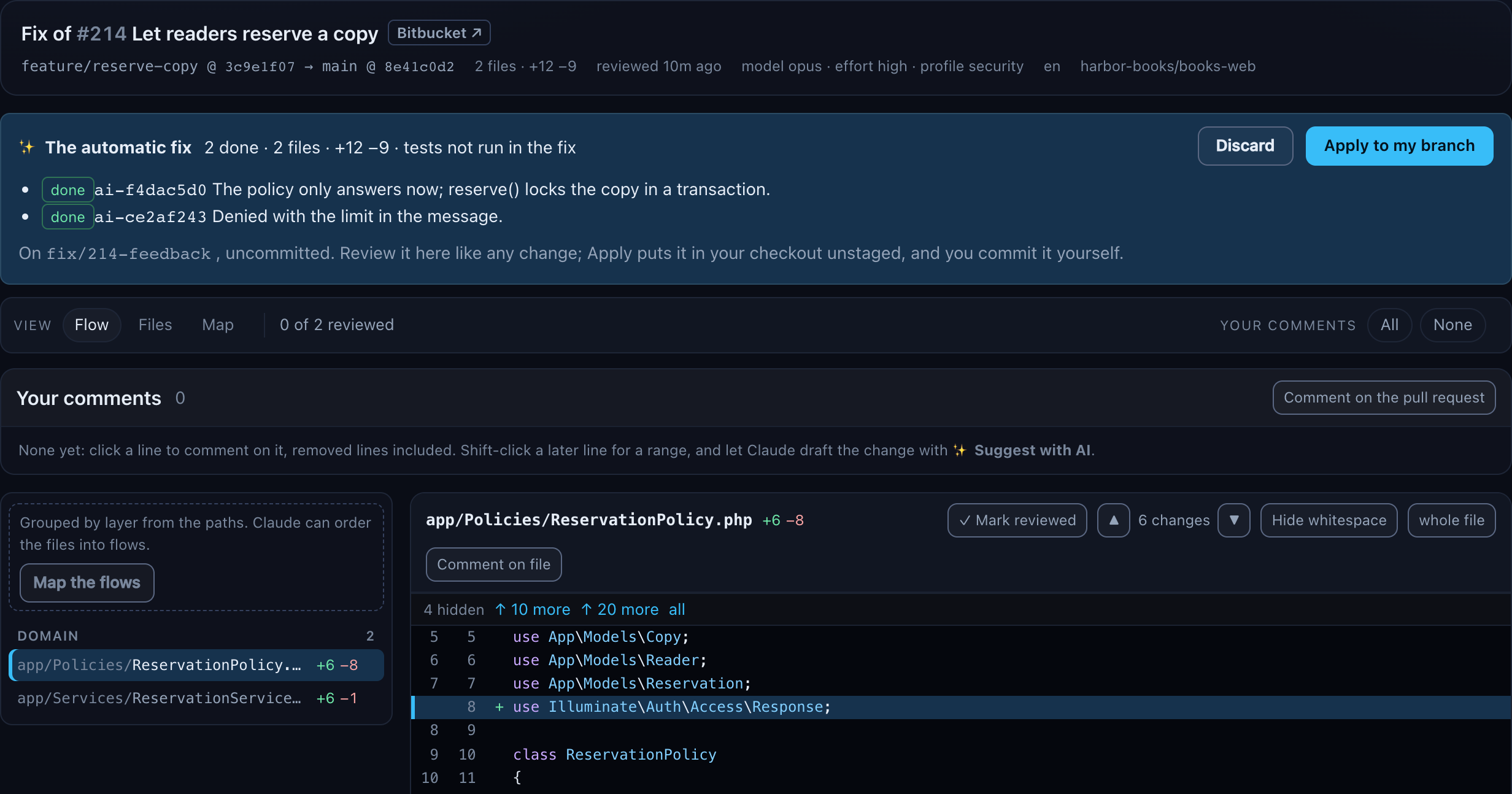
- Apply to my branch puts the change into your checkout of the repository as uncommitted, unstaged changes, with
git apply --3way. It looks again first, and refuses when your checkout is not on the pull request's branch, is at another commit than the one the fix was made at, or has uncommitted changes of its own in a file the fix touches. It then lists the files it changed. - Run tests, after Apply, runs the project's declared test command in your checkout, the way
dqx rundoes:review.fixTestwhen it names one, else the command namedtest, else the first with "test" in its name. Its output shows live in a small log under the banner, up to about 20 kB, then the result: passed or failed, the exit code and the end of the output. It refuses when the project declares none. The fix run itself never runs tests. - Discard removes the fix worktree and its
fix/<pr>-feedbackbranch, and the fix's review. It removes no other branch and leaves your checkout alone.
Plan again on a finished or failed fix asks first: A previous fix is still here (branch fix/214-feedback). Discard it and plan again? Discard and plan again removes it the way Discard does and starts the new plan in the same job; Keep it leaves everything as it is. It is refused while a fix run is running.
What never happens: dqx commits, pushes, posts, replies or resolves nothing, and Claude has no tool to do any of it. You review the fix, apply it, commit it and push.
Tokens and logins
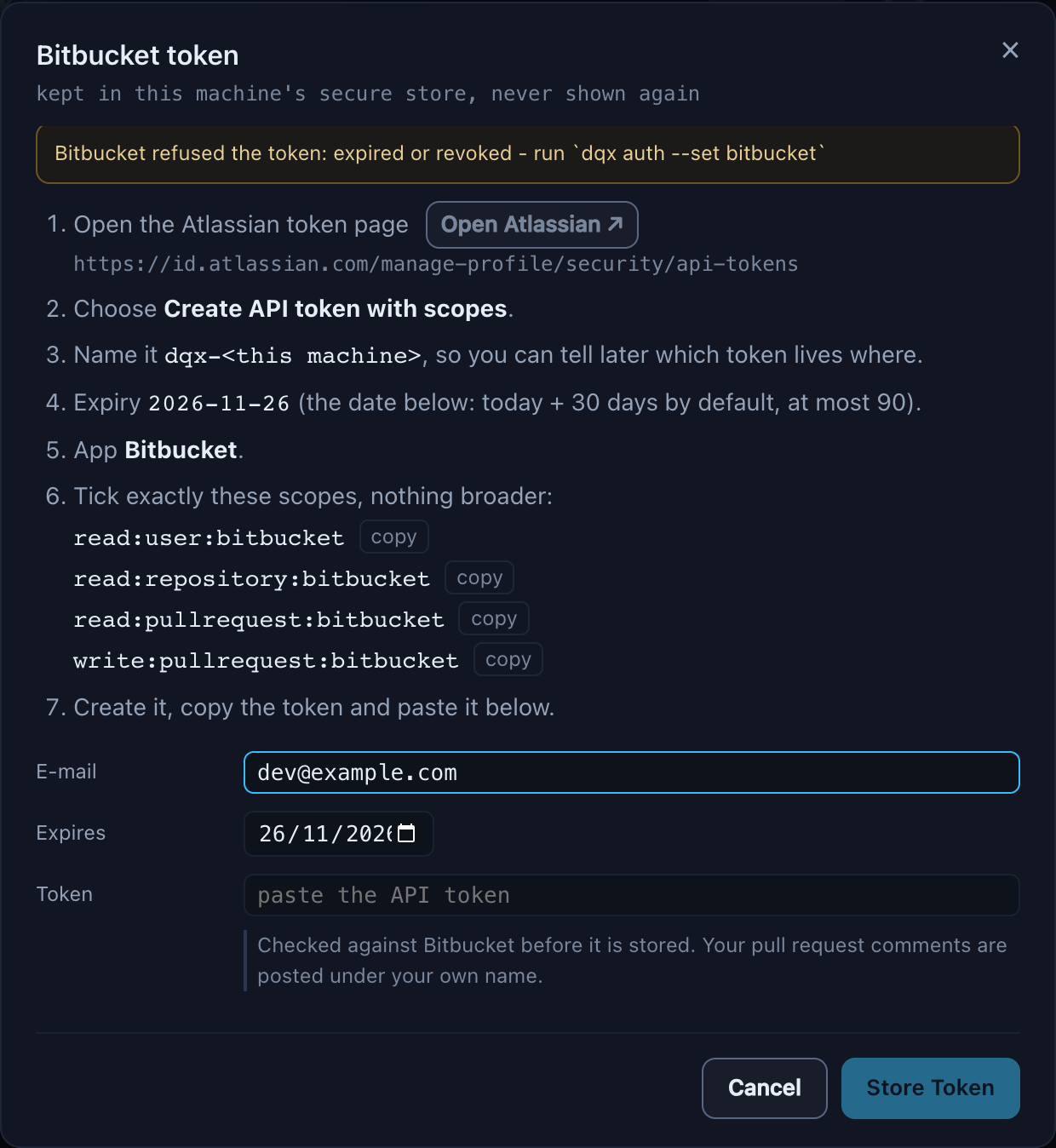
Bitbucket. Without a token, or with one that expired, the tab asks for one: the steps on the Atlassian page, the four scopes each with a copy button, the e-mail, the expiry date (30 days from today by default, at most 90) and a password field for the token. Store Token checks it against Bitbucket first and names a missing scope; a stored token is never sent back to the page. From five days before it expires, a Bitbucket: n days left chip in the header opens the same dialog.

The dialog only stores into the Keychain or libsecret. A machine with neither is told to use dqx auth --set bitbucket --insecure-store in a terminal: a plaintext file is not something a browser should be able to choose.
GitHub. There is nothing to fill in, because dqx keeps no GitHub token. Without gh, or without a login, the repository's group says which command to run in a terminal (gh auth login), and reload tries again.

Why a token and not your SSH key, and where each is kept: a Bitbucket token.